
Can I use my own domain for a link in bio for free?
Quick answer
Rarely. Linktree has no custom domain on any plan, and Beacons, Carrd, Taplink, and Milkshake charge for one. Google Sites, Cloudflare Pages, and GitHub Pages connect one free but aren't link-in-bio tools. Convika's Free plan connects 1 custom domain to a link page with 2 DNS records; you pay only the registrar.
Making it on the template's page is free and uses no AI credits. You sign up free when you publish, with no credit card.
On this page
Linktree's help center puts it in one line: “Linktree doesn't support custom domains.” Beacons, Carrd, Taplink, and Milkshake do support one, on a paid plan. The hosts that connect a domain for free, such as Google Sites, Cloudflare Pages, and GitHub Pages, aren't link-in-bio tools: you build the page some other way and bring it to them.
Convika's Free plan connects 1 custom domain to a link page with 2 DNS records and no code. Its template Link-in-bio page on your own domain, free makes the page from what you write: your name, then your links under headings such as work and social, with the one you most want opened shown first and larger. Each vendor fact on this page was read on the vendor's own site on November 6, 2026.
Which link-in-bio tools connect a custom domain for free
Read on November 6, 2026, on each tool's pricing page and help center. The links are under Sources.
| Tool, free plan | Custom domain on the free plan | Cheapest plan with a custom domain | Branding on the free page | Forms on the free plan | Visitor stats on the free plan |
|---|---|---|---|---|---|
| Linktree | No: “Linktree doesn't support custom domains.” | None, on any plan | Linktree logo in the footer; Pro and Premium can hide it | Yes, a contact form | Last 28 days |
| Beacons | No | Creator, $10 a month or $100 billed yearly | Beacons branding | Yes, email and phone collection | “Real-time analytics” |
| Carrd | No | Pro Standard, $19 a year | “Made with Carrd”; Pro Lite, $9 a year, removes it | No; contact and signup forms start with Pro Standard | No; site analytics start with Pro Standard |
| Taplink | No | BUSINESS, $6 a month billed yearly ($72 a year) | Taplink branding, removed on BUSINESS | No; application forms are on BUSINESS | Page views; click stats are on PRO |
| Milkshake | No | Pro+, US$99.99 a year | Milkshake branding, removed from Lite | No; the contact card is on Pro | 30 days of Insights |
| Google Sites | Yes, up to 5 per site, on www or another subdomain | Free with a Google account | A “Site actions” button | Embedded Google Forms; answers stay in Google Forms | Google Analytics, connected in Settings |
| Cloudflare Pages | Yes; a bare domain such as yourname.com needs Cloudflare's nameservers | Free | None | No; its Static Forms plugin hands each entry to code you write | Cloudflare Web Analytics, free |
| GitHub Pages | Yes, www or the bare domain | Free | None | No; it hosts static files | GitHub doesn't say |
| Convika Free | Yes, 1 subdomain such as www.yourname.com; once you add an A record, the bare domain redirects to it | Free | The Convika bar at the foot of the page | Yes, 50 entries a month shown; later ones are held, up to 1,000 more a form, and show on Pro | 90 days, with clicks per link |
Two more tools come up in the same searches. Squarespace's Bio Sites is free at a bio.site address, and its start page says nothing about custom domains. bio.link's site turned away every request to read it on November 6, so it isn't in the table.
The free hosts in the lower rows connect a domain, and each one has a catch for a bio link. Google Sites lays your page out in its own editor, and the address needs www or another subdomain. Cloudflare Pages and GitHub Pages want the page as files in a project, and neither keeps form entries for you; GitHub's Pages limits say GitHub Pages “is not intended for or allowed to be used as a free web-hosting service” to run an online business.
Why your own domain matters for a bio link
A bio link on a vendor's domain is only as permanent as the vendor. Bento, a grid-style link-in-bio tool that Linktree bought, announced that the “Bento platform will shut down on February 13th, 2026.” Its notice went on: “your Bento user and profile data will be deleted and Bento pages will redirect to Linktree.”
On November 6, 2026, bento.me/ and a bento.me/<name> address both answered with a permanent redirect to https://linktr.ee/, Linktree's home page. Anyone who taps an old Bento link in a bio, a printed card, or a past post lands there, not on the owner's new page. Only Linktree can change where those addresses go.
Something similar happened in Japan. Pont closed on September 30, 2026, and its notice says every profile page on pont.co can no longer be viewed.
A link on your own domain belongs to you. If the host closes, or you leave it, you point the domain at the new page, and the link already in your bio, on your cards, and in your old posts goes there. The domain itself is what you keep paying for, at your registrar.
Put your link page on your domain with Convika
The steps below are the short version. For every screen of the domain part, what to do if it won't connect, and the other hosts' records, see put an AI-made page on your own domain, free.
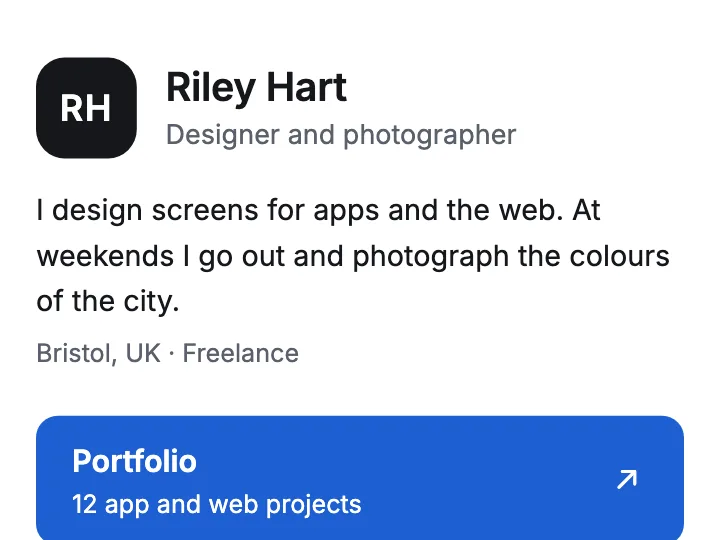
A link page on your own domain
Write your name and your links, and the AI makes a page of them in sections. On the Free plan, it can show at your own domain.
Make the page from the template or your own HTML
Open Link-in-bio page on your own domain, free. Under What should yours be?, write your name, what you do, and your links, with the one you most want opened first. Click Make my link page. You don't need an account to try it: the preview shows up on the same page when it's ready. Click Publish and send it to friends and sign up free, and the page moves into your account.
If ChatGPT, Claude, or Gemini already wrote your link page as HTML, put the file in the free HTML publishing tool and click Get my preview link, or sign up and click Upload an HTML file in the dashboard.
Publish it free
On the page's screen, click Publish page. Under Who can open this page?, choose Public and click Next. The first time, click Publish free. The page is live at once at a convika.page address, with the Convika bar at the bottom.
Connect your domain
On the page's screen, under Custom domain, click Connect my domain. In Domain, type www.yourname.com, or the bare yourname.com: either way, Convika connects www.yourname.com, and the bare domain can redirect to it once you add its A record in the next step. If yourname.com already shows another site, Convika asks whether to keep it as it is, which connects www only, or to redirect it. Click Add domain.
Add the DNS records and check
Convika opens the site's DNS tab. Under DNS setup, it lists a CNAME record and a TXT record for www, each with the name and value to copy into your registrar's DNS settings. For the bare domain, add the A record under Redirect the URL without www too. Then click Check status. The site shows Waiting for DNS until Convika finds the records, then Connected, and the HTTPS certificate is issued for you.
Put the link in your bio
Open https://www.yourname.com on your phone. Once it shows your page, paste that address into your Instagram, TikTok, or other profile.
If you post a link before the domain connects, post a convika.page address with a name you chose. A page you keep from the template starts at an address of page- and 8 random letters and digits, on convika.page. To rename it, open the site's Settings and click Change the URL: the old address redirects to the new one.
What Convika's Free plan doesn't do
- The Convika bar shows on every Free page, on your own domain too. Pro, at $12 a month, publishes without it.
- A cookie banner asks some visitors. On Free pages, it asks visitors in the European Economic Area, the United Kingdom, Switzerland, and the places near them under the same rules (Andorra, Monaco, San Marino, Vatican City, Gibraltar, Jersey, Guernsey, the Isle of Man, and France's overseas territories), and visitors whose country can't be told. Visitors anywhere else aren't asked.
- The page stops after the month's page views run out. Free includes 10,000 page views a month across your pages; the pricing page says what happens past them.
- Free pages are public. A private link or a password is Pro.
- The domain itself is bought separately, from a registrar such as Namecheap, GoDaddy, Cloudflare, or Squarespace. Convika doesn't sell domains.
- Analytics tags and custom JavaScript that calls other hosts need Pro. The page's own scripts run on Free, and so do embeds such as a YouTube video, a Spotify player, or a SoundCloud track.
- A limit on live pages. Free publishes 1 page at a time, which is enough for a link page.
Which one to pick
- You want a link page on your own domain, free, without building the layout yourself: Convika's Free plan, with the link-in-bio template or the HTML your AI wrote.
- You want a link-in-bio tool's extras, such as selling or email, and are happy to pay: Beacons Creator or Carrd Pro Standard both add a custom domain. Carrd's is billed by the year.
- You don't need your own domain: Linktree's Free plan, at a linktr.ee address.
- You already work with Git or a Cloudflare account: GitHub Pages or Cloudflare Pages host your files free on your domain. Add a form and stats from somewhere else.
Ready to make yours? Link-in-bio page on your own domain, free turns your name and links into a page of sections, with the link you most want opened shown first, and you can try it before you sign up.
Frequently asked questions
Is there a Linktree alternative that lets me use my own custom domain for free?
Yes. Among the link-in-bio tools compared here, Beacons, Carrd, Taplink, and Milkshake put a custom domain on a paid plan, and Linktree has none on any plan. Convika's Free plan connects 1 subdomain such as www.yourname.com to a link page, and once you add an A record, redirects the bare domain to it. Google Sites, Cloudflare Pages, and GitHub Pages connect a domain free too, but you build the page elsewhere.
Can I keep my Linktree and point my domain at it?
No. Linktree's help article says “Every Linktree uses its own linktr.ee/yourusername URL, and you can't replace it with your own domain,” and adds: “We also don't provide developer tools for setting up domain forwarding.” Its Redirect feature works the other way: it sends people who open your Linktree to a link you choose.
Does a custom domain cost money?
The domain does. You buy it from a registrar and renew it each year, at the registrar's price. Connecting it costs nothing on Convika's Free plan, Google Sites, Cloudflare Pages, or GitHub Pages. On Beacons, Carrd, Taplink, and Milkshake, connecting it takes a paid plan.
Should my bio link use www or the bare domain?
Paste the www address, such as www.yourname.com, into your bio: on Convika, that's where the page opens. Once you add the A record under Redirect the URL without www on the site's DNS tab, yourname.com redirects there too. If yourname.com already shows another site and you keep it, it stays as it is. Google Sites needs www or another subdomain. GitHub Pages serves the bare domain too, and Cloudflare Pages does once the domain's nameservers are Cloudflare's.
My website is already on www. Can I still use my domain?
Yes. Use a new subdomain such as links.yourname.com for the link page. Pointing www at Convika would replace the site that opens there now, so connect the new subdomain instead, and your website stays as it is.
Does the Convika bar show on my own domain?
Yes. On the Free plan, the Convika bar shows at the foot of the page on its convika.page address and on your domain. Pro, at $12 a month, publishes without it.
Sources
Each read on November 6, 2026:
- Linktree, custom domains: https://linktr.ee/help/en/articles/6571689-can-i-change-the-linktree-url-to-a-custom-domain (updated October 27, 2026)
- Linktree, hiding the logo: https://linktr.ee/help/en/articles/5434182-can-i-hide-the-linktree-logo (updated October 27, 2026)
- Linktree, plans: https://linktr.ee/s/pricing (read on November 6, 2026)
- Beacons, plans: https://beacons.ai/i/pricing and https://help.beacons.ai/en/articles/4695681 (read on November 6, 2026)
- Carrd, plans: https://carrd.com/docs/pro/plans (read on November 6, 2026)
- Taplink, plans: https://taplink.at/en/ (read on November 6, 2026, in a browser)
- Milkshake, plans: https://milkshake.app/pricing/ (read on November 6, 2026)
- Squarespace Bio Sites: https://biosites.com/start (read on November 6, 2026)
- Google Sites, custom domains: https://support.google.com/sites/answer/9068867 (read on November 6, 2026)
- Google Sites, forms and Analytics: https://support.google.com/sites/answer/90569 and https://support.google.com/sites/answer/97459 (read on November 6, 2026)
- Cloudflare Pages, custom domains: https://developers.cloudflare.com/pages/configuration/custom-domains/ (read on November 6, 2026)
- Cloudflare Pages, Web Analytics: https://developers.cloudflare.com/pages/how-to/web-analytics/ (read on November 6, 2026)
- Cloudflare Pages, Static Forms: https://developers.cloudflare.com/pages/functions/plugins/static-forms/ (read on November 6, 2026)
- GitHub Pages, what it is: https://docs.github.com/en/pages/getting-started-with-github-pages/what-is-github-pages (read on November 6, 2026)
- GitHub Pages, custom domains: https://docs.github.com/en/pages/configuring-a-custom-domain-for-your-github-pages-site/about-custom-domains-and-github-pages (read on November 6, 2026)
- GitHub Pages, limits: https://docs.github.com/en/pages/getting-started-with-github-pages/github-pages-limits (read on November 6, 2026)
- Bento's shutdown notice, as archived on December 22, 2025: http://web.archive.org/web/20251222114959/https://bento.me/home/bento-sunset (read on November 6, 2026)
- Pont's closing notice: https://help.pont.co/pont-close-notice.html (read on November 6, 2026)
Next step
How to share an HTML file as a link that opens on any phone
Upload the file to a host and send its link; email and Google Drive send the code. 8 hosts compared, from Netlify Drop to Convika, with 4 steps.
Related articles
- Free landing page hosting with a form and your own domain (2026)2 of 11 free plans store form entries on a domain you own without another service: Netlify and Convika. Cloudflare Pages and GitHub Pages have no form.
- Bento alternative: a link in bio that keeps your linkBento shut down on February 13, 2026, and every bento.me link now opens linktr.ee. Compare Bento alternatives on grid layouts and on using your own domain.
- My AI made my link in bio page. How do I put it online for free?ChatGPT, Claude, or Gemini wrote your link in bio page. Get it a link for your Instagram or TikTok bio, free: a prompt to paste and 8 options compared.
- Free link in bio HTML template (copy, edit, and publish)A link in bio page as one HTML file: no build, no outside fonts or scripts. Change your name and links, then publish it free and see which links get tapped.
- Is Carrd free? Free sites, Pro plans, custom domains, and formsYes: Carrd's Free sites run on .carrd.co. Your own domain and forms start with Pro Standard at $19 a year.
- Can I use my own domain on Netlify's free plan, and what does it cost?Yes: Netlify Free includes custom domains with free HTTPS, and connecting one uses no credits. What a domain bought through Netlify costs, and the catches.
AI Skill Pod
Share AI skills with your team, the easy way
Everyone uses your team's skills in their own ChatGPT, Claude or Gemini, on any plan. Send one invite link. Free to start.
Start free on AI Skill Pod