
Free ways to host an AI-made HTML form for internal company use
Quick answer
No free option does it all. Netlify Free hosts your AI-made HTML and keeps its entries, but has no password. Google Forms (with Google Workspace) and Jotform's free Starter can limit who opens a form, but you rebuild it there. GitHub Pages keeps no entries. On Convika Free the page is public; private links are Pro.
Free plan: no credit card, 1 published page, 50 form entries a month shown.
On this page
ChatGPT or Claude made you an HTML form: a site check, a supply request, an incident report. Now colleagues need to open it on their phones and send it back, and the company won't pay for it yet. Hosting the page is the easy part. The hard parts are where the answers go, who can open the link, and what happens to photos. This guide sets 6 free options side by side, each from its own pages, read on November 4, 2026.
For which free hosts allow a business site at all, see Free hosting for a business site: 4 hosts' terms compared.
The short answer, by what you need
- Keep the AI-made file as it is, and collect entries: Netlify Free. Netlify Drop takes the file, and Netlify says its forms service "is free and unlimited for all credit-based plans". You add
data-netlify="true"to the form tag. Password protection isn't on Free. - Only colleagues can open it, with no new account to pay for: Google Forms. If your company uses Google Workspace, Google's help says owners "can restrict the access to a domain, trusted audience, or group of users." You rebuild the form in Google Forms; your HTML isn't used.
- A password on the form, free: Jotform Starter. Jotform's help says that with Password Protection "you decide who can view or submit your form", and Jotform's support says it is "available on forms under Starter (Free) plan". Starter allows 5 forms and 100 monthly submissions, with Jotform branding.
- Your company already has Microsoft 365: SharePoint. Its HTML pages keep your file inside Microsoft 365, but they block a form from sending answers out.
- A page staff fill in and hand on as a PDF or on WhatsApp, made by AI: Convika's field report template. On Free the page is Public, so publish the blank form only.
The 6 free options compared
Each cell comes from the vendor's own page, read on November 4, 2026, listed under Sources.
| Option (free plan) | What free gives you | Takes your AI-made HTML as is | Keeps the entries | Only colleagues can open it | Photos and files |
|---|---|---|---|---|---|
| Convika Free | 1 published page, 50 form entries a month shown, the Convika bar | Yes, one file up to 2 MB | From a field report page's Send to the dashboard, or a form added with Add a form to my page; your own form's fields alone don't | No: a Free page is Public. A private link or a password is Pro | A field report's photos reach the dashboard with Send to the dashboard, and go out in its PDF, share, or HTML copy |
| Google Forms | Google lists no plans or prices for Forms | No: you rebuild the form in Google Forms | Yes, in Google Forms | Yes, if your company uses Google Workspace: "restrict the access to a domain, trusted audience, or group of users" | Yes, but "responders need to sign in to a Google Account" |
| Jotform Starter | "5 Forms", "100 Monthly Submissions", Jotform branding | No: you build the form in Jotform | Yes, in Jotform | A password: "you decide who can view or submit your form" | "100 MB Available Space" for uploaded files |
| Netlify Free | "300 credit limit / month"; at zero, "all of your web projects (sites/apps) are paused" | Yes, through Netlify Drop | Yes, with data-netlify="true" in the form tag: forms are "free and unlimited" | No: "Password protection isn't available on Credit-based Free and Personal plans" | Yes: "Netlify Forms can receive files uploaded with form submissions" |
| GitHub Pages | Pages "in public repositories with GitHub Free" | Yes, from a repository | No: it's "a static site hosting service" | No: private sites need "GitHub Enterprise Cloud" | No, and not "for sensitive transactions like sending passwords or credit card numbers" |
| SharePoint | No free plan: Microsoft 365 Business Basic, with Forms, is "$7.00 user/month, paid yearly" | Yes, as a SharePoint HTML page: in early access now, released to every organization from mid-November to late December 2026; a site owner can turn it off | Not from the page: SharePoint "blocks arbitrary fetch requests and outbound API calls from HTML pages" | Yes: pages keep "existing permissions" | Not from the page, for the same reason |
Keep the AI-made file, or rebuild the form?
Google Forms and Jotform keep your entries and handle who can answer, but neither runs the HTML your AI wrote. You type the questions in again, and the layout becomes theirs. That's often fine for a short form. It stops being fine when the page does more than ask: a checklist that adds up, a photo per item, a Save as PDF button, a location filled in by the phone. How to embed a Google Form in an HTML page covers the middle way: your page, with a Google Form inside it.
Hosts that keep your file need somewhere for the answers to go. A form's own <form> tag sends nothing until a service receives it. Netlify Forms is that service on Netlify. GitHub Pages has none, so the form needs an outside service, as How to add a form to a landing page without a backend explains. SharePoint's HTML pages block a page's requests to the outside, so a form there can't send its answers anywhere.
Who can open it: the internal part
"Internal" usually means people outside the company can't open the form, or can't see what was sent. Check both before you pick.
- Signed in as a colleague. Google Forms limited to your company's domain (with Google Workspace), a private Netlify project (visitors sign in with Netlify credentials; on Free only the team owner can open it, Netlify's Password Protection doc says), GitHub Pages published privately (GitHub Enterprise Cloud only), and SharePoint's permissions all check who someone is.
- A shared password. Jotform's Password Protection and Convika's Only people with the password (Pro) ask everyone the same password. Anyone who has it gets in, inside your company or not.
- Anyone with the link. Netlify Free, GitHub Pages on a public repository, and Convika Free. A link forwarded outside the company opens there too, and a Convika Free page can also show up in search results and in Convika's gallery.
If the form only asks for answers and holds none, a public link can be enough: the answers go to you, not onto the page. If your company's rules say data must not leave its systems, ask your IT team first. For Microsoft 365, see How to share an HTML file in SharePoint or OneDrive.
Photos and files
Field reports often need a photo. Each option handles it differently:
- Google Forms takes a file upload only from someone signed in to a Google Account.
- Jotform Starter stores uploads in its 100 MB of space.
- Netlify Forms takes a file input in the form.
- Convika: in a field report, staff take or add photos on the page. Photos go out in the PDF, a share, or the HTML copy. Send to the dashboard sends the report's answers and photos.
Make the form on Convika with the field report template
Convika's field report template asks for the job, who fills it in, and the fields. Its AI makes a phone-first page with text, choice lists, yes / no / N/A checks, a date and time that starts at now, a place with Use my location, and photos. Staff open one link, fill it in, and hand the report on as a PDF, through the phone's share sheet or WhatsApp, as Excel (CSV), or as HTML with photos. With Send to the dashboard, each report's answers and photos also arrive in your dashboard as one form entry, and you get an email for each one.
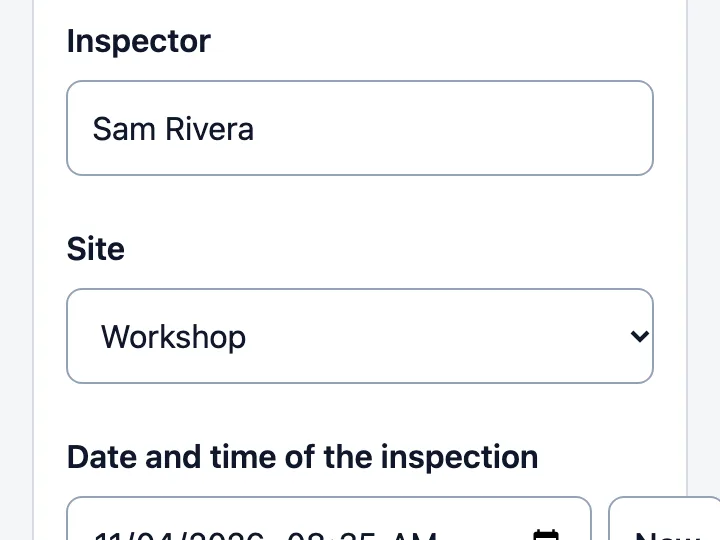
Field report form
Turn a site inspection, shift handover, or incident report into a page staff fill in on a phone, add photos to, and hand on as a PDF or on WhatsApp.
To change a choice list later, ask the AI to change it and publish again: the link stays the same. Each change uses 1 AI credit.
Host an AI-made form on Convika in 4 steps
1. Check the file
Convika takes one .html or .htm file, up to 2 MB, or the same code pasted into the box. CSS and photos go inside the file.
2. Upload it and keep it
Drop the file into the upload box at the top of this page. Click Keep this page — free, no card and sign up. The page moves into your account, where its scripts run.
3. Give it somewhere to send the answers
A form your AI wrote doesn't send its answers to Convika by itself. On the page's screen, Add a form to my page adds a short Convika form. For a longer report, make the page from the field report template instead, with Send to the dashboard.
4. Publish it and send the link
Click Publish page. Under Who can open this page?, choose Public and click Next. The first time, click Publish free. A Public page can show up in search results and in Convika's gallery; to keep it out, choose Private link or Only people with the password (Pro, $12 a month). Copy the address under Live URL and send it to the team, or click Show QR code to print it.
Frequently asked questions
What's the best free way to host an HTML form for internal company use?
It depends on what "internal" means for you. To keep your AI-made HTML and its entries, Netlify Free does both, with no password. To let only colleagues answer, rebuild the form in Google Forms and, if your company uses Google Workspace, restrict it to your domain. For a password on a free form, use Jotform Starter. No free host here gives all three.
Can I host an HTML form for free without coding?
Yes. Netlify Drop and Convika's upload box take the file as it is, with no code. To keep the entries, Netlify needs data-netlify="true" added to the form tag, which you can ask the AI to add. On Convika, the field report template makes a form that sends each report's answers and photos to your dashboard.
How do I make a form only people in my company can open?
Use a tool that checks who is signed in: Google Forms restricted to your company's domain if it uses Google Workspace, SharePoint with its site permissions, or a private Netlify project on Netlify Pro (on Free only the team owner can open it). A password, as on Jotform or Convika Pro, keeps out people without it, but anyone with the password gets in.
Where do submissions from an HTML form go?
Nowhere, until a service receives them. Netlify Forms keeps them on Netlify; GitHub Pages has no form service; SharePoint's HTML pages block requests to the outside. On Convika, a field report page with Send to the dashboard sends each report's answers and photos as one entry, which you see in the dashboard, with an email for each one.
Can staff upload photos in a free form?
On Google Forms, only after signing in to a Google Account. Jotform Starter stores uploads in its 100 MB. Netlify Forms takes a file input. A Convika field report needs no sign-in: its photos reach your dashboard with Send to the dashboard, and go out in the PDF, a share, or the HTML copy.
Is GitHub Pages OK for an internal form?
Not for the answers: GitHub calls Pages "a static site hosting service", so the form needs another service to receive them. A site on GitHub Free is public, and publishing privately needs GitHub Enterprise Cloud. GitHub also says Pages sites "shouldn't be used for sensitive transactions like sending passwords or credit card numbers."
Sources
- Choose a type of question for your form (Google Docs Editors Help) (read on November 4, 2026)
- Publish & share your form with responders (Google Docs Editors Help) (read on November 4, 2026)
- Jotform pricing (read on November 4, 2026)
- How to password-protect your form (Jotform) (read on November 4, 2026)
- Which plan is the password protection feature included in? (Jotform support answer) (replied June 20, 2024; read on November 4, 2026)
- Netlify pricing (read on November 4, 2026)
- How credits work (Netlify Docs) (last updated August 12, 2026; read on November 4, 2026)
- Forms setup (Netlify Docs) (last updated September 16, 2026; read on November 4, 2026)
- Password Protection overview (Netlify Docs) (last updated October 7, 2026; read on November 4, 2026)
- What is GitHub Pages? (GitHub Docs) (read on November 4, 2026)
- GitHub Pages limits (GitHub Docs) (read on November 4, 2026)
- Changing the visibility of your GitHub Pages site (GitHub Docs) (read on November 4, 2026)
- Compare SharePoint plans (Microsoft) (read on November 4, 2026)
- Create, upload, edit, and publish HTML pages in SharePoint (Microsoft) (read on November 4, 2026)
- MC1479517: SharePoint: HTML pages (Microsoft 365 Message Center, archived by mc.merill.net) (published September 25, 2026; read on November 4, 2026)
Next step
How to see who visits a page you made with AI
Count visitors and see where they came from on a page ChatGPT, Claude, or Gemini made. GA4, Cloudflare, Plausible, Clarity, and Convika compared.
Related articles
- Send an HTML report to your manager so it opens properly on their phoneAn .html attachment opens as a preview or a download on a phone. Send a PDF when the report is done, or a link when it must run. Steps for each, compared.
- A shift handover form your team fills in on their phones, made with AIMake a shift handover form with AI that staff open from one link, fill in on a phone, add photos to, and hand on as a PDF or on WhatsApp. Steps and limits.
- Which free hosting lets me run a business site? GitHub Pages, Netlify, Vercel, Cloudflare Pages: what each one's terms sayNetlify Free and Cloudflare Pages allow a business site; GitHub Pages and Vercel Hobby don't. Each host's rule, quoted and dated, across 10 kinds of site.
- How to embed a Google Form in an HTML page (and when to use a built-in form)Copy a Google Form's embed HTML into your page and set the width to 100% for phones. Why an embed shows blank, and a built-in form instead.
- How to make the signup form on your AI-made page actually workThe form ChatGPT or Claude wrote sends entries nowhere. Compare Formspree, Netlify Forms, Google Forms, and Convika, then set one up step by step.
- How to share an HTML file in SharePoint or OneDrive so it opens as a pageSharePoint and OneDrive download an .html file or show its code instead of running it. What Microsoft says, SharePoint's HTML pages, and sharing a link.