
AI template
Manning's equation calculator, made with AI
A Manning's equation calculator for open channels and part-full pipes: flow from depth or normal depth from flow, with the Froude number and critical depth.
Make your own
Convika's AI makes your own tool in the example's format, fitted to what you write. Try it on your phone right away, no account needed.
Making it here is free and uses no AI credits. Once you sign up, each page the AI makes in your dashboard uses 1 credit, and new accounts start with 10.
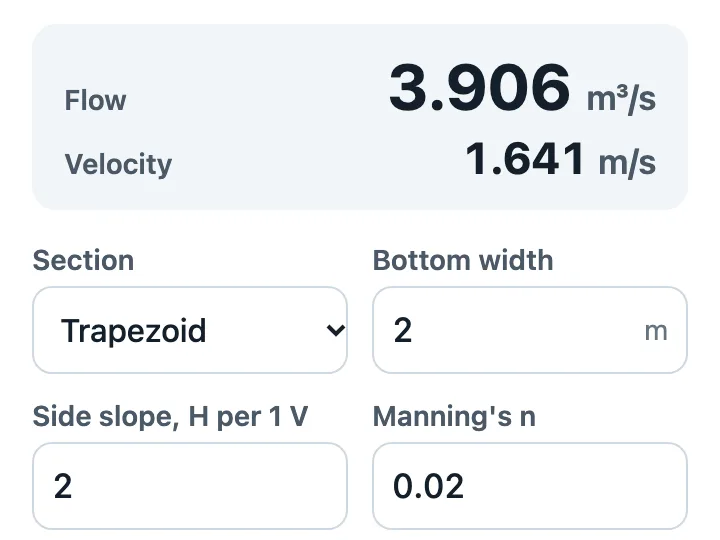
Flow from a depth, or the normal depth for a flow, in a rectangle, a trapezoid, or a circular pipe flowing part full, by Manning's equation in SI or US units. The page shows the area, wetted perimeter, hydraulic radius, Froude number, and critical depth beside the result, and a pipe's full and greatest flows.
Say what your team's version needs: your channel sections, your n values, your culvert sizes, your company's name. The AI keeps the formulas and the depth solver and writes your changes into the page, which computes on the phone and sends nothing anyone types.
How it works
1
Say what you want
Write what to change from the example: the subject, how many, the colors. Tap an idea to start from it.
2
The AI makes the page
Convika's AI writes the page in a few minutes, and you see a preview. Ask for changes in plain words until it's right.
3
Publish and share the link
Publish the page to get its own URL, then share it on X, LINE, or in class.
What it costs
Making a page uses 1 AI credit, and each change you ask for uses 1. A new account starts with 10 credits, so you can try a template without paying. Publishing on the Free plan is free.
Don't use the names, images, or text of existing shows, games, characters, or brands. The AI makes an original page on the same theme.
Use these instructions with ChatGPT or Claude
This is the template's description of its example, as Convika's AI gets it. Write what you want on the last line, paste it into ChatGPT, Claude, or another AI, and it writes the page as one HTML file.
Make a Manning's equation calculator page for an engineering team that checks ditches, channels, and culverts in the field.

What it calculates:
- Q = (k / n) A R^(2/3) S^(1/2), with k = 1 in SI and 1.486 in US units; R = A / P.
- Trapezoid (a rectangle has z = 0): A = y (b + z y), P = b + 2y √(1 + z²), T = b + 2 z y.
- Circular pipe part full: θ = 2 arccos(1 − 2y / D), A = (θ − sin θ) D² / 8, P = θ D / 2, T = D sin(θ / 2). The flow is greatest at about 0.938 D; a flow above that has no normal depth, and the page says so.
- Normal depth from a flow by bisection to 1 part in 10^10, with an iteration cap, in place of Goal Seek.
- Froude number V / √(g A / T), with g = 9.81 m/s² or 32.2 ft/s², and critical depth from A³ / T = Q² / g.
- Inputs: the section (rectangle, trapezoid, circular pipe), the bottom width and side slope or the pipe's diameter (m or ft), Manning's n, the bed slope, and the flow depth or the flow (m³/s or cfs), with the choice of finding the flow or the depth

How it calculates:
- Write each formula as a plain JavaScript function, with every coefficient, constant, and lookup table written into the file. No eval, no new Function, and no library that parses formulas with them.
- Load nothing from another site and send nothing anywhere: no fetch, no XMLHttpRequest, no form posts. The page computes everything in the browser.
- An iteration or a Goal Seek becomes a loop with a stated tolerance and an iteration cap; when it doesn't settle, say so on the page.
- A lookup (VLOOKUP, XLOOKUP, INDEX/MATCH) becomes a table in the file with the same match rule (exact, or the next row down for an approximate match), interpolated where the sheet interpolates.
- Round only where the sheet rounds, as Excel does (ROUND takes halves away from zero).
- Copy every name, tag, ID, and number the request gives exactly, character for character: P-101 stays P-101.
- Convert units in one place, a table of factors, and check each shown value against its unit label: watts shown as kilowatts are off by 1,000.

What it shows:
- Every input with its label and its unit, prefilled with the example's values, in text fields that open the number keyboard (inputmode="decimal"). Offer a unit switch (SI and US) where the calculation has units.
- The result first: a compact summary of the main result, large, with its unit, right under the title and any unit or method switch and above the inputs, so it shows on a phone's first screen and changes as an input does. It is the page's one aria-live="polite" region. The values in between go below the inputs, each with its name and unit, so someone can check the result against the sheet.
- The results update as soon as an input changes. An input that can't be calculated (empty, zero where it divides, outside the formula's range) gets a short message instead of a wrong number.
- Show 0 for a zero result, never -0, and the same number of decimals for every amount of money.
- A short "How it calculates" section that lists the formulas and their ranges (folded in details and summary, it keeps an arrow that turns when it opens: a summary set to display:flex loses the browser's own), and a last line with the version ("v1", and a date only when the request gives one) and "check its results against your own standard before you rely on them".

Layout: phone first, held upright (390px): labels above fields, two fields to a row, no sideways scrolling, body text 16px, every field and button at least 44px tall (min-height: 44px on each input, select, and button itself, with box-sizing: border-box). On a wide screen, three fields to a row. No images, web fonts, or CSS frameworks: one plain style block.

Write it as one HTML file with the CSS and JavaScript inside. Don't send anything people type anywhere, and don't use image files. Make it work on a phone held upright. Keep the bottom right of the screen clear: a Support button may show there.

That is the example. Keep how it works, its screens, and its feel, and change the content to fit what I want.
What I want: ___
Questions
Why can't a pipe carry more flowing full?
Near the crown, the wetted perimeter grows faster than the flow area, so the hydraulic radius drops: a part-full pipe carries the most at about 0.938 of its diameter, about 7.6 % more than flowing full. Above that flow there's no normal depth, and the page says so.
Where does n come from?
From your own table for the lining and its condition, such as FHWA's or your agency's. Type it in, or ask the AI to add a list of your linings that fills it in.
How does it find the normal depth?
By halving: it tries depths between 0 and one that carries more than the flow, and keeps the half that holds the answer until the depth is within 1 part in 10 billion. That is what Excel's Goal Seek does, with a stated tolerance.
Other templates
- Class team quiz
Enter a subject and topic, and the AI makes a team quiz page you can project in class.
- Personality test
Pick a theme, and the AI makes a personality test page: a few questions, a result type, and a link to share it.
- Flashcards and quiz
List the words as front / back, and the AI makes flashcards you can flip plus a multiple-choice quiz.
- Memory match
List the pairs, and you get a memory game page where players flip cards to find matching pairs.
- Reaction time test
You get a game page that measures how fast people tap when the screen changes, in milliseconds.
- Catch game
Choose what to catch and what to dodge, and you get a game page where things fall from the top of the screen.
- Science or math simulation
Say what to simulate and for which grade, and the AI makes a page where students move sliders and watch what changes.
- Timer, calculator, or tracker
Pick a timer, a calculator, or a tracker and say what it's for, and the AI makes a tool page that's ready to use as soon as it opens.
- Event page and sign-up
Write the event's name, date, and place, and the AI makes a page that announces it and takes sign-ups.
- Shop menu and info
Write your shop's name and menu, and the AI makes a page that shows the menu, prices, and hours clearly on a phone.
- 1 in how many? roll
List some traits and their options, and you get a page that rolls a random combination, works out how rare it is, and lets players share it.
- 10-second score attack
Pick the emoji to tap and the time limit, and you get a game page where players tap pop-up targets for the highest score.
- Quiz battle
Write the questions or name a theme, and you get a timed four-choice quiz page where fast answers score more and players share their score to challenge friends.
- Stack tower
Pick the emoji that rides on top and the difficulty, and you get a game page where players tap to stack moving blocks as high as they can.
- Trip itinerary
Describe your trip and get a draft itinerary with daily plans, a meeting spot, packing and rain options, and a page to share.
- Field report form
Turn a site inspection, shift handover, or incident report into a page staff fill in on a phone, add photos to, and hand on as a PDF or on WhatsApp.
- A profile that looks like you
Write your name, your links, and what you love, add a vibe like "pastel and a bit silly", and the AI makes a profile that looks like you.
- Your works and world
Write your name, your work, and your links, and the AI makes a page that shows your work large and takes commission requests through a form.
- A link page on your own domain
Write your name and your links, and the AI makes a page of them in sections. On the Free plan, it can show at your own domain.
- Calculator from your sheet
Paste your sheet's inputs, formulas, and units, or a VBA macro, and the AI makes one calculator page your team opens on a phone.
- Pump head calculator
A total dynamic head and pump power calculator for water lines, in SI or US units, that the AI fits to your pipe table, your units, and your company.
- Quote calculator
A price calculator for your clients or your staff, built from your price table, options, minimum order, and tax, that gives a quote on any phone.
- NPSH available calculator
An NPSH available calculator your operators open on a tablet: from the tank or a suction gauge, with the margin over the pump's NPSHr, in SI or US units.
- Voltage drop calculator
A voltage drop calculator electricians open on a phone: single-phase, three-phase, or DC, AWG or mm², with the smallest size within your limit.
- Duct size calculator
An HVAC duct sizing calculator for phones: the round size by equal friction and a velocity limit, the equal-friction rectangle, and the drop along the duct.
- Slurry pipeline calculator
A settling slurry calculator: deposition velocity by three correlations, head loss by Durand-Condolios or Wilson-GIW, and the pump's head and power.