
The best AI model for a one-page HTML website (November 2026), and how to put the page online
Quick answer
Claude Opus 5.5 is the best AI model for writing a one-page HTML website for most people in November 2026, and you put the page online by dropping the .html file on Convika and clicking Publish free, or by asking Claude or ChatGPT to publish it through the Convika connector. Opus 5.5 ranks 2nd on Arena's WebDev leaderboard, behind Claude Fable 5.2, which costs twice as much, and in our 9-model test it built a finished page that fit a phone in 57 seconds for $0.15. On Arena's HTML-only board GPT-6.1 Sol and GPT-6 Astra rank 1st and 2nd; for $0, Claude Free includes Sonnet, and Gemini 4 Hydrogen is free on the Gemini API.
Free plan: no credit card, 1 published page, 50 form entries a month.
On this page
Ask Claude Opus 5.5 for your one-page website, and put the HTML file it gives you online with Convika: drop the file into the upload box above, or let Claude or ChatGPT publish it for you. Opus 5.5 ranks 2nd on Arena's WebDev leaderboard, behind Claude Fable 5.2 at twice the price. When we sent the same landing page prompt to 9 models with the same settings, Opus 5.5 finished first.
Every model fact below comes from Arena's leaderboards and the labs' own pages, read on November 16, 2026. The test results come from our same-prompt test, run that morning. Model names and prices change every few weeks, so each table carries its checked date.
Best AI model for HTML websites in 2026
Arena ranks AI models from people's votes on what each model builds. Its WebDev boards are the ones for web pages, and on November 16, 2026, they read:
- WebDev, overall (dated November 13, 1,007,405 votes): Claude Fable 5.2 1st, Claude Opus 5.5 2nd, Claude Sonnet 5.5 3rd, Gemini 4 Carbon 4th, GPT-6 Astra 5th.
- Frontend, "HTML or React code generation" (dated November 14, 872,612 votes): Claude Fable 5.2 1st with a score of 1867, Claude Opus 5.5 2nd with 1862, then Claude Sonnet 5.5, Gemini 4 Carbon, Qwen4-Max, and GPT-6 Astra.
- HTML, "HTML code generation" only (dated November 14, 208,433 votes): GPT-6.1 Sol 1st with 1796, GPT-6 Astra 2nd with 1786, Gemini 4 Carbon 3rd, Claude Fable 5.2 4th, Claude Sonnet 5.5 5th. Claude Opus 5.5 is 9th, with 1729. Arena's rank spread for each of the first 7 starts at 1st.
Our test adds what the leaderboards don't show: what one page costs, how long it takes, and whether the model sticks to your facts. We sent one prompt for a bakery's landing page with a sign-up form to 9 current models through OpenRouter, once each, and opened every page on a 390 px phone.
The models for a one-page HTML site, checked November 16, 2026. Arena ranks each model at the setting in its name there (Max, xHigh, or High). Prices are the lab's own, except where a cell says OpenRouter.
| Model | Our test: one landing page | Arena rank: HTML / Frontend | API price per 1M tokens, in / out | Where to use it |
|---|---|---|---|---|
| Claude Opus 5.5 | Finished in 57 s, $0.15; only our facts | 9th / 2nd | $4 / $20 | Claude Pro, $20 a month; API |
| Claude Fable 5.2 | Finished in 117 s, $0.53; only our facts | 4th / 1st | $8 / $40 | Claude Max, $100 a month; API |
| GPT-6 Astra | Finished in 65 s, $0.27; only our facts | 2nd / 6th | $10 / $50 | ChatGPT Pro, from $100 a month; Codex on Plus, $20; API |
| GPT-6.1 Sol | Not in our test | 1st / 8th | $2 / $10 | Codex on ChatGPT Plus, $20; API |
| Gemini 4 Carbon | Finished in 73 s, $0.07; added facts | 3rd / 4th | $2 / $10 to November 30, then $4 / $20 | Google AI Ultra, $99.99 a month; API |
| Kimi K3.1 Pro | Finished in 97 s, $0.14; only our facts | 13th / 13th | $2 / $10 (OpenRouter) | Kimi API; OpenRouter |
| Grok 4.7 | Finished in 539 s, $0.23; only our facts | 26th / 23rd | $2 / $6 | Grok; xAI API |
| DeepSeek V4 Pro | Finished in 111 s, $0.05; added facts | 47th / 44th | $1.32 / $3.96, half off-peak | DeepSeek API |
| Qwen3.8 Max | No page in 20,000 tokens; the second run was 396 px wide | 19th / 15th | $2 / $6 (OpenRouter) | Alibaba Cloud; OpenRouter |
| GLM 5.3 | No page in 20,000 tokens; the second run added facts | 37th / 31st | $0.084 / $3.60 (OpenRouter) | Z.ai API; OpenRouter |
"Added facts" means the page invented details the prompt never gave, such as cancel rules or a baking day. Every finished page fit a 390 px phone except Qwen's second run, and none logged a console error. The full test has the prompt, each page's screenshots, and what each did well and badly.
Qwen's newest model, Qwen4-Max, came after our test: it has been on Qwen Cloud since November 16, through a Token Plan or the pay-as-you-go API, and ranks 5th on Arena's Frontend board and 7th on its HTML board. It costs $1.50 / $4.50 per million tokens in Singapore and $1.413 / $4.24 in Beijing and Global, with a 1,000,000-token context. Its weights aren't on Hugging Face (checked November 20, 2026).
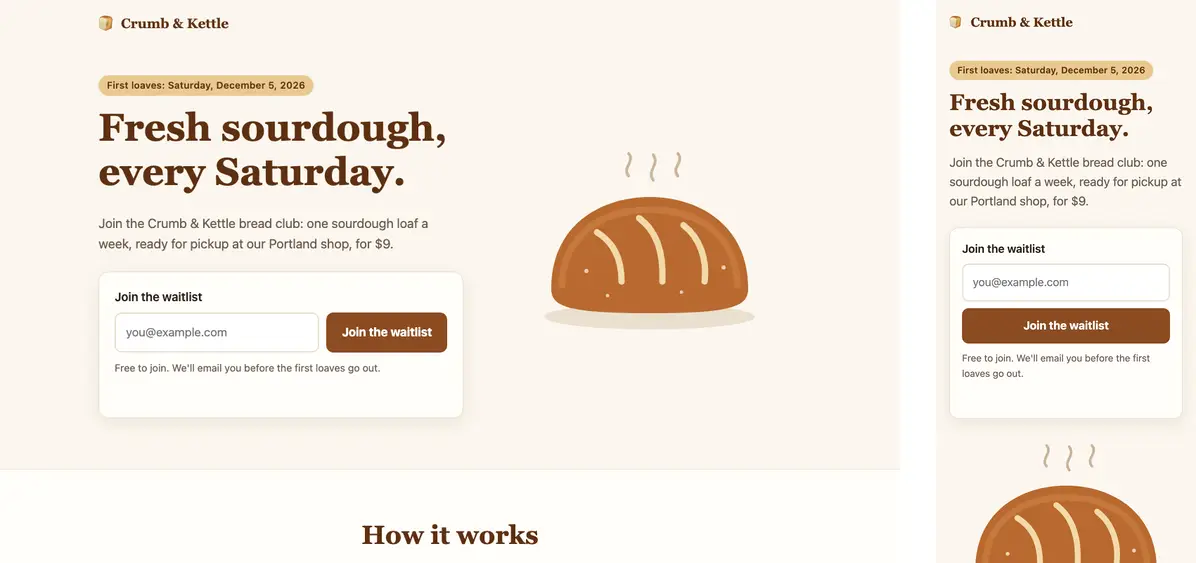
Which to pick:
- Most people: Claude Opus 5.5. 2nd on Arena's WebDev and Frontend boards, the fastest finished page in our test at the shared settings, and only the facts we gave. It comes with Claude Pro at $20 a month, and Anthropic's models page says to "start with Claude Opus 5.5 for most workloads."
- The top WebDev score: Claude Fable 5.2. 1st overall and on Frontend. It costs twice what Opus 5.5 does per token, and its test page cost $0.53 against Opus's $0.15.
- HTML only, from OpenAI: GPT-6.1 Sol. 1st on Arena's HTML board at $2 / $10, and in Codex on ChatGPT Plus. GPT-6 Astra, 2nd there, was the only model in our test whose form told visitors it saved nothing.
- The lowest cost per page: DeepSeek V4 Pro or Gemini 4 Carbon, at 5 and 7 cents in our test at the shared settings. Both added details the bakery never gave, so read every sentence before you publish.
For GPT-6 Astra against Claude Opus 5.5 on coding benchmarks and price, see GPT-6 vs Claude Opus 5.5. For every lab's newest model, see the best AI models right now.
Best free model for an HTML page
You can make a one-page site for $0 in 3 places. Checked November 16, 2026:
| Where, for $0 | Model you get | Arena HTML rank |
|---|---|---|
| Claude Free | Sonnet and Haiku; Anthropic's current Sonnet is Claude Sonnet 5.5 | Sonnet 5.5: 5th at xHigh, 11th at High |
| Gemini API free tier, in Google AI Studio | Gemini 4 Hydrogen, "Free of charge" for input and output | 6th, preliminary |
| ChatGPT Free | GPT-6, based on GPT-6 Luna | GPT-6 Luna: 38th |
- Claude Free is the strongest free pick on Arena's boards: Sonnet 5.5 is 3rd overall and on Frontend, behind only Fable 5.2 and Opus 5.5. Opus needs Claude Pro.
- Gemini 4 Hydrogen costs nothing on the Gemini API's free tier, and you can use it in Google AI Studio. Google's pricing page lists "Content used to improve our products" for the free tier. Gemini 4 Carbon "is not available on the Free tier."
- ChatGPT Free uses GPT-6 based on GPT-6 Luna, per OpenAI's help center. ChatGPT Plus ($20 a month) moves chat to GPT-6 Sol.
Publishing is free too: Convika's Free plan publishes 1 page with a form and visitor stats, and asks for no credit card.
How to put the HTML page online
The model gives you one HTML file. Convika takes that file, a folder of files, or a .zip, and gives you a preview link in seconds without an account. A free account then publishes it at a link that lasts.
On Convika: drop the file
- Save the reply as
index.html. If the model wrapped it in a code fence, keep everything from<!DOCTYPE html>to</html>. - Drop it into the upload box at the top of this page. Drop the file, its folder, or a
.zip, or paste the code, then click Get my preview link. The link works for 3 minutes. It shows the layout with scripts and forms off. - Click Keep this page — free, no card and sign up. The page moves into your account as you uploaded it, and its scripts run.
- Publish. Click Publish page, choose Public, and click Next. The first time, click Publish free. The page goes live at an address like
yourpage.convika.page, with the Convika bar at its foot. Pro ($12 a month) removes the bar.
On Convika: ask Claude or ChatGPT to publish it
Connect Convika once, and the chat that wrote the page also publishes it. Claude saves the page to Convika, replies with a private preview link, and publishes it when you say so. This uses no Convika AI credits, because your AI writes the page.
- Claude (web or desktop): go to Customize > Connectors, click + Add, then Add custom connector. Name it Convika, enter
https://mcp.convika.com, click Add, and sign in to Convika. Claude Free includes 1 custom connector. - ChatGPT (web, on Business, Enterprise, and Edu): open Plugins, select +, then Add custom MCP server. Enter
https://mcp.convika.comas the Server URL, choose OAuth, select Create as a plugin, and install it. In a chat, type@and pick it. On every other ChatGPT plan, drop the file on Convika as above. - Claude Code: run
claude mcp add --transport http convika https://mcp.convika.com, then sign in from/mcp.
Then ask: "Publish this page on Convika and give me the preview link." When it looks right, say "Publish it."
Netlify Drop
Netlify's quickstart: go to app.netlify.com/drop and "drag and drop your project folder or zip file to the Netlify Drop zone". The site's address ends in netlify.app. Netlify says that if you drop without signing in, "your project URL is protected with a temporary password until you claim it." How to use Netlify Drop walks through the claim.
GitHub Pages
GitHub's quickstart and file upload guide, in 4 steps:
- Create a repository named
<username>.github.io. On GitHub Free, Pages works in public repositories. - Select Add file, click Upload files, drag in
index.html, and commit it. - Click Settings, then Pages. Under Build and deployment, under Source, select Deploy from a branch, and pick the branch.
- Open
https://<username>.github.io. GitHub says "it can take up to 10 minutes for changes to your site to publish."
Deploy HTML, CSS, and JS files for free compares these hosts with Cloudflare Pages and Vercel, and free HTML hosting compared adds more.
Skipbox
Cheap & fast GitHub Actions runners, unlimited for $39 a month
Your own machine keeps Docker layers and package caches between jobs. Switch by changing one runs-on line.
Start a free Skipbox trialAdd a working form
Every finished page in our test had a sign-up form, and none sent the email anywhere: each script showed a message on the page and kept nothing. A Convika form keeps every entry.
- On the dashboard: open the page and click Add a form to my page, choose the fields, and set the button text. Convika puts the form where the page has
<div data-convika-form></div>, or above the footer. Delete the model's own form, so no visitor fills in one that goes nowhere. - Through the connector: ask Claude or ChatGPT, "Add an email sign-up form to my Convika page." It adds a Convika form and saves a new preview.
Entries arrive under Forms, with CSV export. Free shows 50 entries a month and keeps later ones for Pro. The page's analytics show visitors, where they came from, and how many sent the form. For other ways to collect entries, see how to make the sign-up form on your AI-made page work.
Prompt to paste
Fill in the brackets and paste this into Claude, ChatGPT, or Gemini. It keeps the rules that made the difference in our test:
Make a one-page website for [what it's for], as one HTML file.

The facts: [name, what you offer, price, place, dates, how to reach you].

Sections: a headline with one line under it, [the sections you want], and a footer with [address, hours, contact].

Rules:
- One self-contained HTML file: the CSS in a <style> tag, any JavaScript in a <script> tag. No frameworks and no build step.
- Mobile-first: no sideways scrolling on a 390 px wide phone, and it looks good on a desktop too.
- No external images. Use CSS, emoji, or inline SVG for any pictures.
- Use only the facts above. Don't add prices, policies, dates, or claims of your own.
- Where the sign-up form goes, put <div data-convika-form></div> instead of writing a form.
- Reply with only the HTML file, starting with <!DOCTYPE html>.
With the Convika connector on, add one line at the end: "Then publish it on Convika and give me the preview link."
- "Use only the facts above" is there because 4 of the 9 models invented details in our test.
- The
data-convika-formline marks where Convika puts a form that keeps entries. - Through an API, give a reasoning model room: at a 20,000-token limit, GLM 5.3 and Qwen3.8 Max ran out before they finished.
Frequently asked questions
Which AI model is best at writing HTML?
Claude Opus 5.5 for most people, as of November 16, 2026. It ranks 2nd on Arena's WebDev and Frontend leaderboards behind Claude Fable 5.2, which costs twice as much, and in our 9-model test it built a finished page in 57 seconds for $0.15. On Arena's HTML-only board, GPT-6.1 Sol and GPT-6 Astra rank 1st and 2nd.
Is Claude or ChatGPT better for making a website?
Claude leads Arena's WebDev and Frontend boards: Claude Fable 5.2 1st and Claude Opus 5.5 2nd, with GPT-6 Astra 5th overall and 6th on Frontend. On the HTML-only board, OpenAI's GPT-6.1 Sol and GPT-6 Astra rank 1st and 2nd. In our test, Opus 5.5 finished 8 seconds sooner than GPT-6 Astra and cost $0.12 less.
What is the best free AI for building a website in HTML?
Claude Free. It includes Sonnet, and Claude Sonnet 5.5 ranks 3rd on Arena's WebDev and Frontend boards and 5th on HTML. Gemini 4 Hydrogen is free on the Gemini API's free tier and ranks 6th on HTML. ChatGPT Free uses GPT-6 based on GPT-6 Luna.
How do I put an HTML file online for free?
Drop it on Convika. The upload box at the top of this page takes the .html file, its folder, or a .zip, and gives you a preview link without an account. Sign up free, click Publish page, choose Public, click Next, and click Publish free: the page goes live at a convika.page address.
Can Claude or ChatGPT publish the website for me?
Yes, with the Convika connector. Add https://mcp.convika.com as a custom connector in Claude, or as a custom MCP server under Plugins in ChatGPT Business, Enterprise, or Edu, and sign in to Convika. Then ask the chat to publish the page: it saves it to Convika, replies with a preview link, and puts it live when you say so.
Do I need GitHub or Netlify to host an AI-made page?
No. Convika publishes the HTML file you drop, with no repository, no build step, and no command line. The same page keeps its form's entries and counts its visitors.
Does the sign-up form on an AI-made page collect emails?
No. None of the forms in our test sent the address anywhere: each showed a message on the page. On Convika, click Add a form to my page, and entries arrive under Forms. Why the form doesn't send, and how to fix it.
How much does it cost to make a one-page website with AI?
From half a cent to 53 cents a page through the API in our test, and $0 in Claude Free or on the Gemini API's free tier. Publishing it on Convika's Free plan costs nothing.
Sources
Read on November 16, 2026, between 15:07 and 15:20 JST, unless marked.
- Arena: WebDev leaderboard (dated November 13, 2026), WebDev Frontend and WebDev HTML (both dated November 14, 2026).
- Convika: we gave 9 AI models the same landing page prompt, run November 16, 2026, 08:34 to 09:00 JST, with OpenRouter's list prices read at 08:30 JST.
- Anthropic: models overview, Claude plans, custom connectors.
- OpenAI: models, Codex pricing, Intelligent UI in ChatGPT, add a custom MCP server.
- Google: Gemini API pricing, Google AI plans.
- xAI: models. DeepSeek: models and pricing. Moonshot AI: Kimi API pricing.
- Netlify: Netlify Drop quickstart. GitHub: Pages quickstart, creating a Pages site, adding a file to a repository.
Next step
How to password protect an HTML page or website
A JavaScript password script leaves the password in the page source. To password protect an HTML page or link, encrypt the file or let a server check it.
Related articles
- We gave 9 AI models the same landing page prompt: here's what they builtOne landing page prompt, sent once to GPT-6 Astra, Claude, Gemini 4, Grok 4.7, DeepSeek, Qwen, Kimi and GLM on Nov 16, 2026. Cost, time, phone test.
- The best AI models right now (November 2026): GPT-6, Claude, Gemini, and Grok comparedGPT-6 Astra, Claude Fable 5.2 and Opus 5.5, Gemini 4 Carbon, and Grok 4.7 compared: release dates, context, API prices, plans, and each lab's own benchmarks.
- GPT-6 vs Claude Opus 5.5 (November 2026): which is better for coding, and what each costsGPT-6 Astra vs Claude Opus 5.5 for coding: each lab's own benchmarks, API prices with long-prompt rates, plans, GPT-6 vs GPT-5.6, and Astra vs Fable 5.2.
- How to deploy an HTML, CSS, and JavaScript site for freeA site of HTML, CSS, and JS files is static, so 5 hosts serve it free. Which need an account, Git, or an index.html, from each host's docs on November 15, 2026.
- How to use Netlify Drop at app.netlify.com/drop: is it free, and what happens after 1 hourNetlify Drop is at app.netlify.com/drop: drag a folder, zip, or HTML file onto it for a free netlify.app link. Why it asks for a password, and the 1-hour claim.
- How to collect emails from a static HTML page without a backendUpload the HTML page to Convika and its email form saves every entry, no backend: stored, emailed to you, CSV export, free. For pages from Claude, ChatGPT, or by hand.