
Free, no signup
Digital business card maker, free with a QR code
Type your name, what you do, and your contact details. Convika's AI makes your digital business card: one page with your links, a Save contact button that adds you to a phone's contacts, and its own link and QR code.
Your business card
Convika's AI lays out your details as a card that fits a phone screen. Try it on your phone right away, no account needed.
How to make a digital business card
1
Type your details
Write your name, title, company, work phone, email, and links, in any order.
2
Get your card
In a few minutes the AI makes the card. Open it on your phone and tap Save contact to see what people get.
3
Share the link or QR code
Sign up free and publish the card. It gets a link for your email signature and a QR code for a paper card, a badge, or a slide.
What's on your card
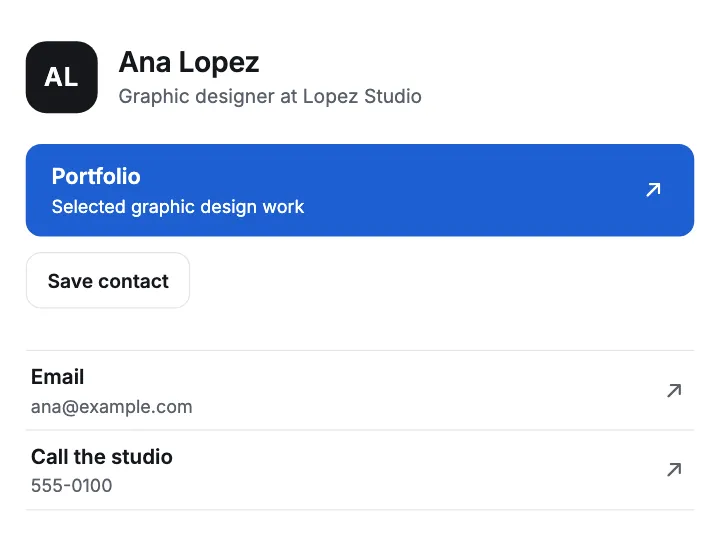
- Your name, title, and company at the top, with your picture or your initials
- One large button for the link you most want opened: your booking page, your portfolio, or your shop
- A Save contact button that hands your name, phone, and email to the phone's contacts as a vCard (.vcf)
- Your other links in tidy groups, each with a line on what's there
- A look that matches the words you give it, such as "dark and calm"
- One page that fits a phone screen and opens with no app
What Free gives and what Pro adds
On Free, your card is live at its own link, with its QR code in your dashboard. You see its page views, its visitors, and which links people tap, and it can show at your own domain, such as www.yourname.com.
Pro takes the Convika bar off your page, keeps 100 pages live at once, and opens a page only to people with its private link or password. Pro starts with a free trial: 7 days free, then $12 a month, cancel any time before it ends.
Frequently asked questions
Is the digital business card free?
Yes. Making the card here is free and needs no account. To keep it, sign up for a free Convika account and publish it on the Free plan: the link, the QR code, and the visitor stats come with it.
How do I get a QR code for my digital business card?
Publish the card and open it in your dashboard: its QR code is shown next to its link, ready to print. The link stays the same when you change the card, so a printed code always opens the newest version.
How does Save contact work?
The button holds your details as a vCard (.vcf) file inside the page. Tapped on an iPhone, it opens a contact card with a button that creates the contact. Write a work phone number or a work email in your request and the card gets the button.
Can I change my card later?
Yes. Ask the AI in your dashboard, such as "change my title to Senior Designer", and publish again. The link and the QR code stay the same.
Can my card use my own domain?
Yes. The Free plan connects a custom domain. Type it under Custom domain on the page's screen and add the DNS records it shows. You buy the domain itself from a registrar.
Guides
Make a free digital business card with a QR code using ChatGPT
Ask ChatGPT or Claude for a one-page card, publish it at an address that stays, and print its QR code. Blinq, HiHello, and Wave Connect compared.
How do I create a QR code for an HTML file?
To convert an HTML file to a QR code, publish it at an address that stays, then click Show QR code and download a PNG. The code holds a link, not the file.
Can I use my own domain for a link in bio for free?
Convika Free puts your link in bio on a custom domain, free. Linktree allows none on any plan; Beacons, Carrd, Taplink, and Milkshake charge. See who allows it.