
AI template
Make a timer, calculator, or tracker with AI
Pick a timer, a calculator, or a tracker and say what it's for, and the AI makes a tool page that's ready to use as soon as it opens.
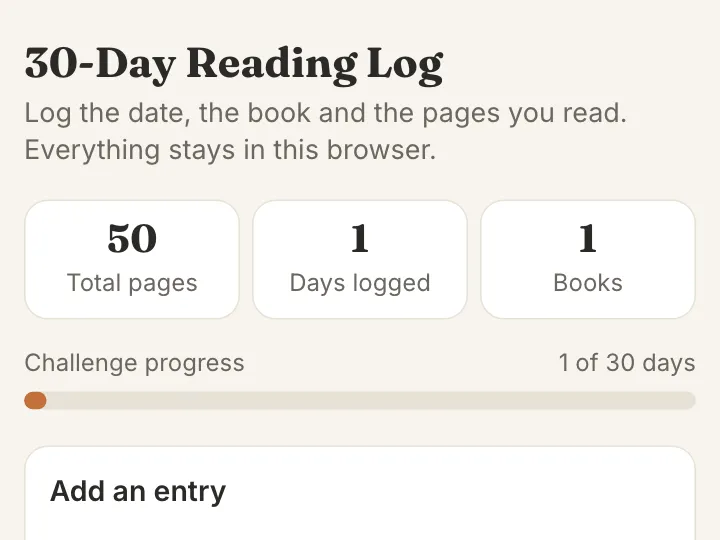
Make your own
Convika's AI makes your own tool in the example's format, fitted to what you write. Try it on your phone right away, no account needed.
Making it here is free and uses no AI credits. Once you sign up, each page the AI makes in your dashboard uses 1 credit, and new accounts start with 10.
A one-screen tool: a timer for group work, a calculator that splits a bill or adds up scores, or a tracker for practice sessions or chores.
Say what it's for, and the AI picks the fields and buttons that fit. What people type stays in their own browser. On a page published on Convika, the text of each button pressed, such as "Add entry", is recorded as a click.
How it works
1
Say what you want
Write what to change from the example: the subject, how many, the colors. Tap an idea to start from it.
2
The AI makes the page
Convika's AI writes the page in a few minutes, and you see a preview. Ask for changes in plain words until it's right.
3
Publish and share the link
Publish the page to get its own address, then share it on X, LINE, or in class.
What it costs
Making a page uses 1 AI credit, and each change you ask for uses 1. A new account starts with 10 credits, so you can try a template without paying. Publishing on the Free plan is free.
Don't use the names, images, or text of existing shows, games, characters, or brands. The AI makes an original page on the same theme.
Use these instructions with ChatGPT or Claude
This is the template's description of its example, as Convika's AI gets it. Write what you want on the last line, paste it into ChatGPT, Claude, or another AI, and it writes the page as one HTML file.
Make a tracker page for this use.

- What it's for: a reading log for a 30-day reading challenge
- Fields to include: date, book title, pages read; show the total pages and how many days are logged
  (if not given, choose the fields and buttons that fit the use)
- The tool is on the first screen, ready to use, with 1 or 2 lines of explanation at most.
- For a timer: the time left in large type; Start, Pause, and Reset; and buttons to pick a time. When time is up, change the screen's color and play a short beep with the Web Audio API (with a mute button). Count from the time Start was pressed, so switching tabs never makes it drift.
- For a calculator: number fields that open the number keyboard (inputmode="decimal"), with the result updated on every keystroke. Show how it calculates, and say so on screen when an input can't be calculated, such as dividing by zero.
- For a tracker: a table where rows can be added, edited, and deleted, with a summary such as totals or counts; a button that saves it as a CSV file (made with a Blob and downloaded); and "Clear all", with a confirmation.
- Save entries and settings in the browser (nothing is sent anywhere), so a reload keeps them.
- No sideways scrolling on a phone held upright. Every button and field is at least 44px tall (min-height: 44px; with Tailwind, min-h-[44px]).

Write it as one HTML file with the CSS and JavaScript inside. Don't send anything people type anywhere, and don't use image files. Make it work on a phone held upright. Keep the bottom right of the screen clear: a Support button may show there.

That is the example. Keep how it works, its screens, and its feel, and change the content to fit what I want.
What I want: ___
Questions
Can one page have a timer and a calculator?
It makes one of them, to fit the use you write. Once it's made, ask the AI to "add a calculator under the timer", and it adds one. Each change uses 1 AI credit.
Where is what I enter kept?
Only in the browser you use, and a tracker can also be saved as a CSV file. On a page published on Convika, the text of each button pressed, such as "Add entry", is recorded as a click, but what you type in the fields is never sent.
Does the timer make a sound?
When time is up, the screen changes color and a short beep plays; there's a button to mute it. On a phone set to silent, the beep may not play.
Other templates
- Class team quiz
Enter a subject and topic, and the AI makes a team quiz page you can project in class.
- Personality test
Pick a theme, and the AI makes a personality test page: a few questions, a result type, and a link to share it.
- Flashcards and quiz
List the words as front / back, and the AI makes flashcards you can flip plus a multiple-choice quiz.
- Memory match
List the pairs, and you get a memory game page where players flip cards to find matching pairs.
- Reaction time test
You get a game page that measures how fast people tap when the screen changes, in milliseconds.
- Catch game
Choose what to catch and what to dodge, and you get a game page where things fall from the top of the screen.
- Science or math simulation
Say what to simulate and for which grade, and the AI makes a page where students move sliders and watch what changes.
- Event page and sign-up
Write the event's name, date, and place, and the AI makes a page that announces it and takes sign-ups.
- Shop menu and info
Write your shop's name and menu, and the AI makes a page that shows the menu, prices, and hours clearly on a phone.
- 1 in how many? roll
List some traits and their options, and you get a page that rolls a random combination, works out how rare it is, and lets players share it.
- 10-second score attack
Pick the emoji to tap and the time limit, and you get a game page where players tap pop-up targets for the highest score.
- Quiz battle
Write the questions or name a theme, and you get a timed four-choice quiz page where fast answers score more and players share their score to challenge friends.
- Stack tower
Pick the emoji that rides on top and the difficulty, and you get a game page where players tap to stack moving blocks as high as they can.