
AI template
Make a 10-second score attack with AI
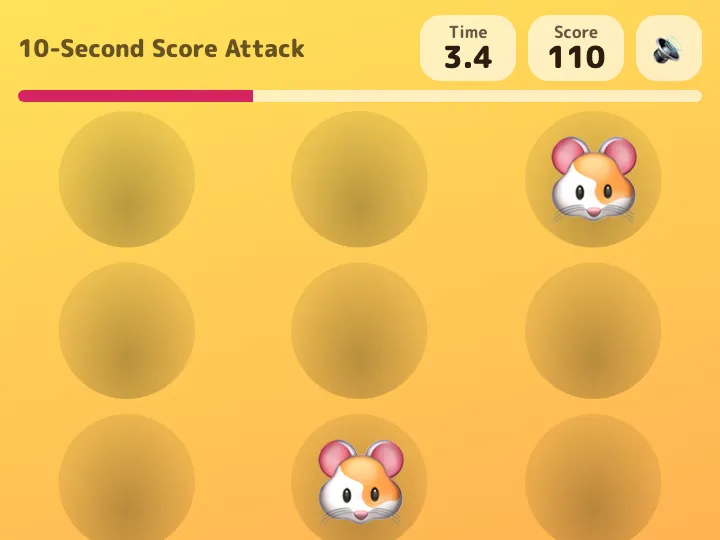
Pick the emoji to tap and the time limit, and you get a game page where players tap pop-up targets for the highest score.
Make your own
Convika's AI makes your own game in the example's format, fitted to what you write. Try it on your phone right away, no account needed.
Making it here is free and uses no AI credits. Once you sign up, each page the AI makes in your dashboard uses 1 credit, and new accounts start with 10.
Emoji pop up from 12 holes, and players tap as many as they can before time runs out. Hits in a row raise a combo multiplier; a rare crown scores big, and a bomb takes points away.
A round lasts 10 seconds, so players go again and again. Share the score and rank, and a friend who opens the link sees "Can you beat it?"
How it works
1
Say what you want
Write what to change from the example: the subject, how many, the colors. Tap an idea to start from it.
2
The AI makes the page
Convika's AI writes the page in a few minutes, and you see a preview. Ask for changes in plain words until it's right.
3
Publish and share the link
Publish the page to get its own address, then share it on X, LINE, or in class.
What it costs
Making a page uses 1 AI credit, and each change you ask for uses 1. A new account starts with 10 credits, so you can try a template without paying. Publishing on the Free plan is free.
Don't use the names, images, or text of existing shows, games, characters, or brands. The AI makes an original page on the same theme.
Use these instructions with ChatGPT or Claude
This is the template's description of its example, as Convika's AI gets it. Write what you want on the last line, paste it into ChatGPT, Claude, or another AI, and it writes the page as one HTML file.
Make a score attack game page: tap pop-up targets before time runs out.

- Title: 10-Second Score Attack
- Target to tap: 🐹 (points each; hits in a row raise a combo multiplier)
- Don't touch: 💣 (takes points away)
- Time limit: 10 seconds, after a 3-2-1 countdown; the clock turns red for the last 3 seconds.
- Targets pop up at random from a 3 × 4 grid of holes and drop back after a moment; more appear as time goes on.
- Colors: pop (yellow and orange)
- Theme: not given (if not given, a look that fits the target)
- Make the sound effects in code with Web Audio (no audio files), with a mute button.
- On a score, particles or a number that pops out; a combo for hits in a row; a small screen shake on a miss.
- Keep the personal best in the browser (send it nowhere).
- At the end, a results screen with the score, a rank name, the personal best, "Play again", and a "Share your result" button that calls window.convika?.shareResult({ text: "Score: {score}", score: number }) ({score} is where the number goes; on a page published on Convika, it shares a link whose card shows the result); without window.convika, share buttons (X, LINE, copy link).
- Holes and buttons are at least 44px tall (min-height: 44px; with Tailwind, min-h-[44px]), with touch-action: manipulation so quick taps never zoom.

Write it as one HTML file with the CSS and JavaScript inside. Don't send anything people type anywhere, and don't use image files. Make it work on a phone held upright. Keep the bottom right of the screen clear: a Support button may show there.

That is the example. Keep how it works, its screens, and its feel, and change the content to fit what I want.
What I want: ___
Questions
How is the score counted?
A target is 10 points and a crown 50, multiplied by your combo (up to ×6). Touching a bomb takes 30 points away and ends the combo.
Does it work on a computer?
Yes, with mouse clicks. On a phone, players tap with a finger.
Can I make it without the AI?
Yes. "Use the example as is" makes the example game your own page, exactly as it is, and uses no AI credits. To change the subject or the look, write what you want under "What should yours be?" and the AI makes it.
Other templates
- Class team quiz
Enter a subject and topic, and the AI makes a team quiz page you can project in class.
- Personality test
Pick a theme, and the AI makes a personality test page: a few questions, a result type, and a link to share it.
- Flashcards and quiz
List the words as front / back, and the AI makes flashcards you can flip plus a multiple-choice quiz.
- Memory match
List the pairs, and you get a memory game page where players flip cards to find matching pairs.
- Reaction time test
You get a game page that measures how fast people tap when the screen changes, in milliseconds.
- Catch game
Choose what to catch and what to dodge, and you get a game page where things fall from the top of the screen.
- Science or math simulation
Say what to simulate and for which grade, and the AI makes a page where students move sliders and watch what changes.
- Timer, calculator, or tracker
Pick a timer, a calculator, or a tracker and say what it's for, and the AI makes a tool page that's ready to use as soon as it opens.
- Event page and sign-up
Write the event's name, date, and place, and the AI makes a page that announces it and takes sign-ups.
- Shop menu and info
Write your shop's name and menu, and the AI makes a page that shows the menu, prices, and hours clearly on a phone.
- 1 in how many? roll
List some traits and their options, and you get a page that rolls a random combination, works out how rare it is, and lets players share it.
- Quiz battle
Write the questions or name a theme, and you get a timed four-choice quiz page where fast answers score more and players share their score to challenge friends.
- Stack tower
Pick the emoji that rides on top and the difficulty, and you get a game page where players tap to stack moving blocks as high as they can.