
AI template
Make a “1 in how many?” roll with AI
List some traits and their options, and you get a page that rolls a random combination, works out how rare it is, and lets players share it.
Make your own
Convika's AI makes your own game in the example's format, fitted to what you write. Try it on your phone right away, no account needed.
Making it here is free and uses no AI credits. Once you sign up, each page the AI makes in your dashboard uses 1 credit, and new accounts start with 10.
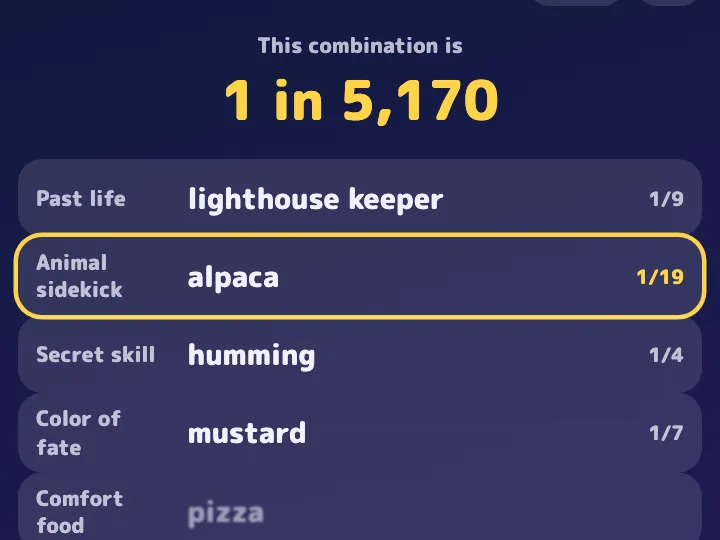
Players roll one trait at a time, such as "past life", "animal sidekick", and "secret skill", and the page multiplies the odds into one number like "1 in 320 million", with a rank from "Common" to "Legendary". Rare picks get their own effects.
Each rank has its own share card, so a post on X or LINE shows the rank's name. Change the traits to any theme you like: favorite snacks, a fan theme, a fantasy world.
How it works
1
Say what you want
Write what to change from the example: the subject, how many, the colors. Tap an idea to start from it.
2
The AI makes the page
Convika's AI writes the page in a few minutes, and you see a preview. Ask for changes in plain words until it's right.
3
Publish and share the link
Publish the page to get its own address, then share it on X, LINE, or in class.
What it costs
Making a page uses 1 AI credit, and each change you ask for uses 1. A new account starts with 10 credits, so you can try a template without paying. Publishing on the Free plan is free.
Don't use the names, images, or text of existing shows, games, characters, or brands. The AI makes an original page on the same theme.
Use these instructions with ChatGPT or Claude
This is the template's description of its example, as Convika's AI gets it. Write what you want on the last line, paste it into ChatGPT, Claude, or another AI, and it writes the page as one HTML file.
Make a "1 in how many?" page: roll a random combination and work out how rare it is.

- Title: 1 in How Many? Fate Roll
- Traits and options (one trait per line: "Trait: option / option / …"; options on the left come up most, on the right rarely):
Past life: village blacksmith / traveling merchant / castle cook / lighthouse keeper / forest herbalist / court musician / sky pirate captain / dragon interpreter
Animal sidekick: shiba inu / calico cat / otter / owl / hedgehog / alpaca / sea turtle / white tiger / golden whale
Secret skill: waking up early / humming / sense of direction / winning raffles / cooking / listening / tongue twisters / handstands
Color of fate: red / navy / mustard / leaf green / cherry pink / ultramarine / silver / gold / iridescent / rainbow
Comfort food: rice balls / pizza / ramen / pudding / roasted sweet potato / tacos / moon cake / a twelve-course feast
Catchphrase: makes sense / fair enough / oh well / same / thank you / genius, right? / this is how legends start / the truth of the universe
Hidden talent: perfect pitch / talks to animals / finds lost things / remembers every dream / stops the rain / sees a little of the future / has two shadows
Born at: morning / noon / dusk / night / midnight / before dawn / the moment of sunrise / a full-moon night / a shooting-star night
Home planet: Earth / the Moon / Mars / Venus / Saturn's rings / the galaxy's edge / an unnamed star / inside a dream
Lucky number: 7 / 3 / 8 / 1 / 5 / 9 / 2 / 4 / 0 / ∞
- Hashtag for posts: not given (if not given, one from the title)
- Colors: night sky (navy and gold)
- Theme: not given (if not given, a look that fits the traits)
- "Roll my fate" spins each trait like a slot reel, top to bottom, and stops it, showing the pick and its odds (1/n). A rare pick spins longer and lights up.
- Multiply the odds into one big "1 in …" number (million, billion, trillion). Rank by it: Legendary at 8 billion or more, Ultra Rare at 100 million, Super Rare at a million, Rare at 10,000, else Common.
- Make the sound effects in code with Web Audio (no audio files), with a mute button.
- On a score, particles or a number that pops out; a combo for hits in a row; a small screen shake on a miss.
- Keep the personal best in the browser (send it nowhere).
- At the end, a results screen with the score, a rank name, the personal best, "Play again", and a "Share your result" button that calls window.convika?.shareResult({ text: "1 in {score}", score: number }) ({score} is where the number goes; on a page published on Convika, it shares a link whose card shows the result); without window.convika, share buttons (X, LINE, copy link).
- Buttons are at least 44px tall (min-height: 44px; with Tailwind, min-h-[44px]).

Write it as one HTML file with the CSS and JavaScript inside. Don't send anything people type anywhere, and don't use image files. Make it work on a phone held upright. Keep the bottom right of the screen clear: a Support button may show there.

That is the example. Keep how it works, its screens, and its feel, and change the content to fit what I want.
What I want: ___
Questions
Are the numbers real statistics?
No. Each option gets odds automatically, higher on the left, and the page multiplies them. It is a number for fun, not from real statistics.
What does sharing post?
A line with the "1 in …" number, the rank, and the picks, plus the page's link. The link shows the rank's own share card.
Can I make it without the AI?
Yes. "Use the example as is" makes the example game your own page, exactly as it is, and uses no AI credits. To change the subject or the look, write what you want under "What should yours be?" and the AI makes it.
Other templates
- Class team quiz
Enter a subject and topic, and the AI makes a team quiz page you can project in class.
- Personality test
Pick a theme, and the AI makes a personality test page: a few questions, a result type, and a link to share it.
- Flashcards and quiz
List the words as front / back, and the AI makes flashcards you can flip plus a multiple-choice quiz.
- Memory match
List the pairs, and you get a memory game page where players flip cards to find matching pairs.
- Reaction time test
You get a game page that measures how fast people tap when the screen changes, in milliseconds.
- Catch game
Choose what to catch and what to dodge, and you get a game page where things fall from the top of the screen.
- Science or math simulation
Say what to simulate and for which grade, and the AI makes a page where students move sliders and watch what changes.
- Timer, calculator, or tracker
Pick a timer, a calculator, or a tracker and say what it's for, and the AI makes a tool page that's ready to use as soon as it opens.
- Event page and sign-up
Write the event's name, date, and place, and the AI makes a page that announces it and takes sign-ups.
- Shop menu and info
Write your shop's name and menu, and the AI makes a page that shows the menu, prices, and hours clearly on a phone.
- 10-second score attack
Pick the emoji to tap and the time limit, and you get a game page where players tap pop-up targets for the highest score.
- Quiz battle
Write the questions or name a theme, and you get a timed four-choice quiz page where fast answers score more and players share their score to challenge friends.
- Stack tower
Pick the emoji that rides on top and the difficulty, and you get a game page where players tap to stack moving blocks as high as they can.