
How to Get Cited by ChatGPT: 20x Clicks in 2 Weeks
On this page
- What does a generative engine optimization case study look like in numbers?
- How do you get cited by ChatGPT and Google's AI Overviews?
- How do I know if ChatGPT cites my site?
- How do you get your website into Google AI Overviews?
- How much does AI search optimization cost?
- Is Generative Engine Optimization (GEO) Different from SEO and AEO?
- You Don't Need to Be an Engineer to Run the 4 Steps
- Frequently asked questions
- Sources
- Pick one next step for your site
To get cited by ChatGPT and Google's AI Overviews, measure your citation rate across real prompts, publish direct guides for the gaps, and automate fast indexing via IndexNow and Search Console. Running this weekly loop grew Convika's daily Google clicks 20x and impressions 11x in two weeks.
What does a generative engine optimization case study look like in numbers?
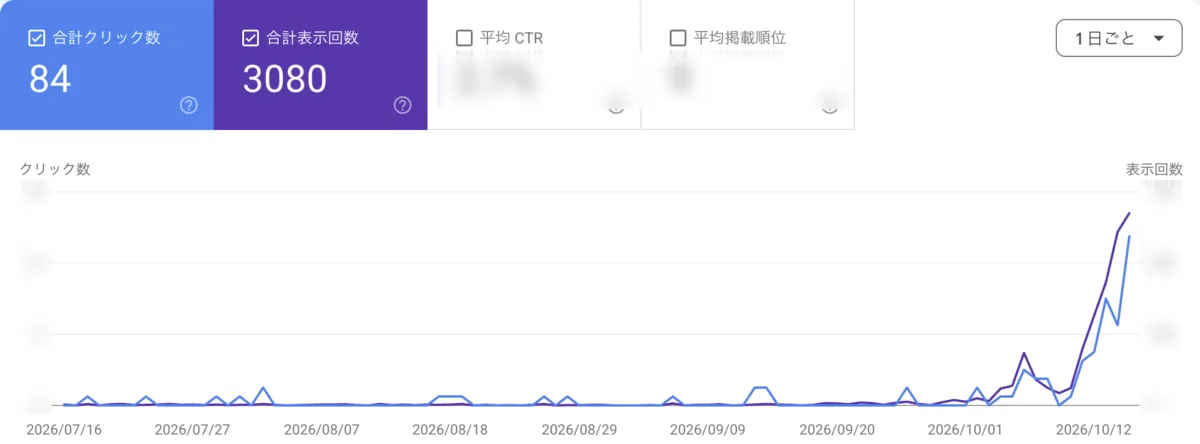
I build Convika (convika.com), a service that publishes an HTML file or a page made with AI at one link. From July through September, Google Search sent the site 0 to 2 clicks a day, and impressions inside Google's generative AI features (AI Overviews and AI Mode) were near zero until late September. After we began measuring AI answers on October 4, 2026 and shipping guides and comparisons for the questions they draw from—68 pages between October 11 and October 17—both search traffic and AI citations moved within two weeks.
| Metric | Before | After | Dates |
|---|---|---|---|
| Google Search impressions | 59 per day | 675 per day (about 11x) | 2026-10-04 vs. 2026-10-15 (3,080 total over 3 months) |
| Clicks from Google Search | 1 per day (0 to 2 per day from July to September) | 20 per day (about 20x) | 2026-10-04 vs. 2026-10-16 (84 total over 3 months) |
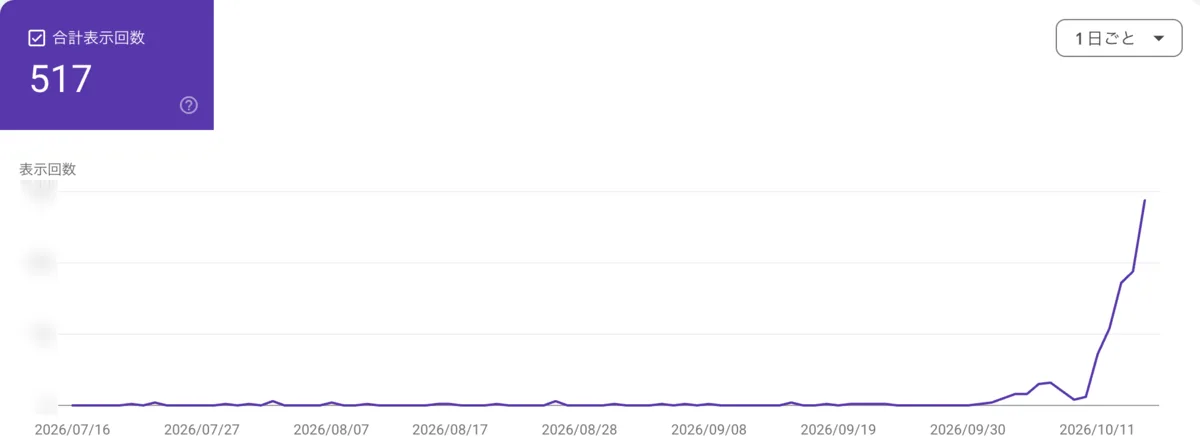
| Impressions in AI features (AI Overviews, AI Mode) | Near zero until late September; 106 over 3 months | Rising from 2026-10-11; about 150 on the latest day (517 over 3 months) | 2026-07-11 to 2026-10-10 vs. from 2026-10-11 |
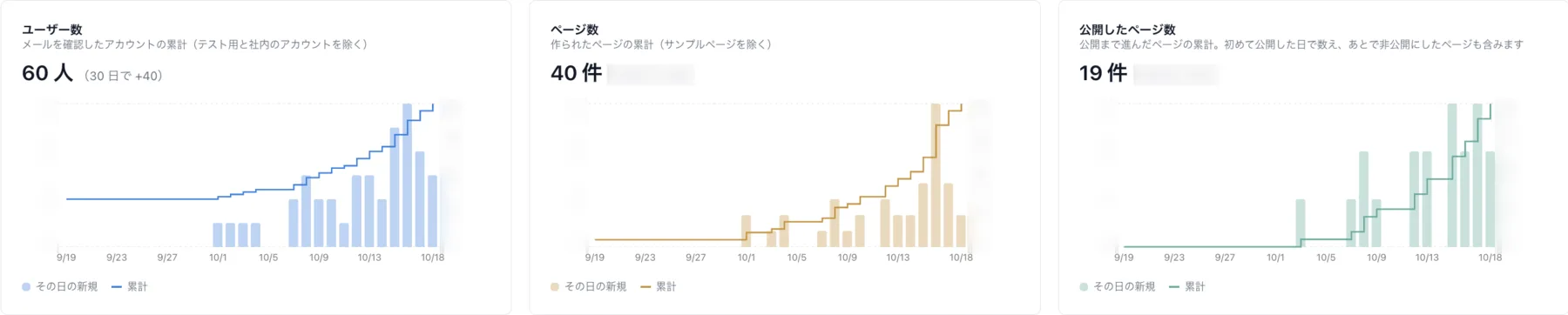
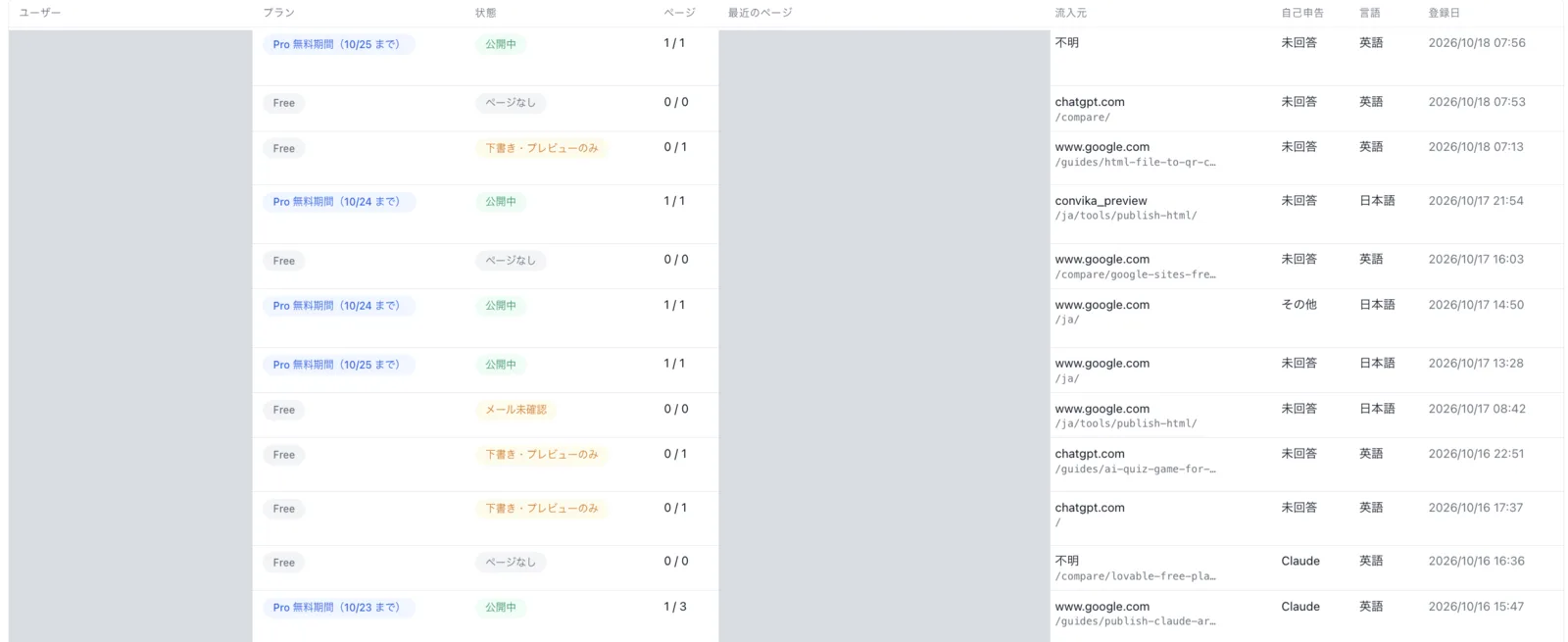
| Sign-ups | About 4 per week | 27 in the last 7 days (Google 9, ChatGPT 5, Convika's free tools 4, Gemini 1, Claude 1); users grew by 40 in 30 days, to 60 | Before vs. 7 days as of 2026-10-18 |
Across the 64 questions we track (35 in Japanese and 29 in English), Convika's citation rate on October 17 was 8% in ChatGPT and 11% in Gemini. The most-clicked page in Google Search is a Japanese guide to sending an HTML file over LINE (/ja/guides/send-html-file-line/), holding an average position of 3.8 and a 9.5% click-through rate. Here are the four screenshots from Google Search Console and our dashboard.
How do you get cited by ChatGPT and Google's AI Overviews?
At Convika (convika.com), we get our pages into AI answers by running four steps in a continuous loop. You do not need to guess how models rank pages—you measure what they actually answer, publish pages that answer those exact questions, push them into search indexes right away, and review the numbers every week.
1. Measure where AI answers already cite you
Start by listing the exact questions your potential users ask AI tools. We test 64 questions—35 in Japanese and 29 in English—across ChatGPT, Perplexity, Gemini, and Google AI Mode, checking whether each response names Convika or links to our site. A single run gathers about 240 answers. We collect these responses using Scrapeless, a scraping API; across 6 measurement days (October 4, 5, 12, 13, 15, and 17, 2026), we pulled 1,498 LLM answers and 195 Google result pages for $4.19. By October 17, our citation rate across those 64 questions reached 8% in ChatGPT and 11% in Gemini.
2. Write and ship guides and comparisons that answer those questions head-on
Use your measurement results to see which questions AI answers draw from, then write guides and comparisons that answer them directly. Between October 11 and October 17, we published 68 pages in 7 days. For example, our most-clicked page is a Japanese guide on sending an HTML file over the messaging app LINE (/ja/guides/send-html-file-line/), which holds an average position of 3.8 and a 9.5% click-through rate. Pay attention to who actually signs up as your pages go live: when we noticed many of our users were teachers creating class materials with AI, we shifted our new topics toward teachers starting October 16.
3. Get new pages indexed within hours
An AI tool cannot cite a page that search engines have not found yet. Every time we publish, our release process automatically pings Bing and other search engines through IndexNow. For Google, we use the Search Console API to check the status of every page on the site and send indexing requests only for the pages that are not yet indexed—about 10 pages a day. Since October 13, new pages have been indexed within hours of going live.
4. Read the numbers weekly and fix what is missing
Treat AI citation optimization as an ongoing loop rather than a one-time setup. Each week, review your search impressions, clicks, and AI citation counts together to decide which topics to write next and which existing pages need updates. At Convika, a search-analysis agent reads these numbers and feeds the next batch of work back into Step 1, keeping all four steps running without stopping.
How do I know if ChatGPT cites my site?
Google Search Console doesn't tell you when ChatGPT, Perplexity, or Gemini mentions your brand, so you have to test the questions yourself. At Convika (convika.com), we track citations with a fixed list of 64 questions—35 in Japanese and 29 in English—that match what our potential users ask.
We send those 64 questions to ChatGPT, Perplexity, Gemini, and Google AI Mode, then check each response to count whether the answer names Convika or links to our site. A single run collects about 240 answers. To automate this without clicking through chat interfaces by hand, we collect the answers using Scrapeless, a scraping API. Across the 6 days we ran this measurement (October 4, 5, 12, 13, 15, and 17, 2026), we collected 1,498 LLM answers and 195 Google result pages for a total cost of $4.19.
For Google's own generative AI features—AI Overviews and AI Mode—you can also check Google Search Console. Convika's impressions in those generative features sat near zero until late September, totaling 106 between July 11 and October 10, 2026. After we started running our loop, they began rising on October 11, reaching 517 over the three-month window and about 150 on the latest day. You can also ask new users where they found you at sign-up: out of 27 sign-ups in the 7 days ending October 18, 5 came from ChatGPT, 1 from Gemini, and 1 from Claude (alongside 9 from Google and 4 from our free tools).
By October 17, our citation rate across the 64 tracked questions reached 8% in ChatGPT and 11% in Gemini.
Measuring citations only matters if you act on what the answers show. Each week, our search-analysis agent reads the latest AI citations alongside Search Console impressions and clicks to decide what to write next and what existing pages to fix:
- Write for the gaps: When we see which questions AI answers draw from—and where Convika is missing—we write guides and comparisons that answer those exact questions head-on. Between October 11 and October 17, we shipped 68 pages based on these findings.
- Update existing pages: When a page is indexed and getting search impressions but still isn't cited in AI answers, the agent flags it for rewrites so the page answers the question more directly.
How do you get your website into Google AI Overviews?
Google's short answer is that you do not need a separate playbook. According to Google Search Central's documentation on AI features and your website, "There are no additional requirements to appear in AI Overviews or AI Mode, nor other special optimizations necessary." To show up as a supporting link, a page simply has to be indexed and eligible to appear in Google Search with a snippet. In Google's guide to optimizing for generative AI features on Google Search, Google states that optimizing for generative AI search is optimizing for the search experience, "and thus still SEO." It also clarifies that LLMS.txt files and other special markup are not needed—Google Search ignores LLMS.txt.
What does change in AI Overviews and AI Mode is how Google searches. Both features can use a "query fan-out" technique, running multiple related searches across subtopics to build an answer. That does not mean spinning up thin pages for every possible phrasing: Google warns that creating separate pages for every fan-out variation just to manipulate rankings or AI responses violates its scaled content abuse spam policy. Instead, it recommends valuable, non-commodity content. Academic research points in a similar direction—while the 2024 KDD paper GEO: Generative Engine Optimization reported that optimization techniques could boost visibility in generative engine responses by up to 40% depending on the domain, the 2025 NeurIPS paper C-SEO Bench: Does Conversational SEO Work? found that most surface-level conversational SEO tweaks were largely ineffective.
At Convika, this meant two things in practice: publishing pages that answer specific questions head-on, and getting those pages indexed as fast as possible so they are eligible to be cited. When we shipped 68 guides and comparisons in the 7 days from October 11 to October 17, 2026, waiting weeks for crawlers to find them would have stalled the whole loop.
To remove the indexing bottleneck, our Search Console subagent runs an automated pipeline on every release:
- Ping Bing and other search engines immediately: Every deploy sends updated URLs through IndexNow, which lets site owners notify search engines of added, updated, or deleted pages right away (up to 10,000 URLs per POST request).
- Check Google index status via API: Google does not use IndexNow, so we use the Search Console API's URL Inspection (
index.inspect) endpoint to check every page on the site. Under Google's Search Console API usage limits, URL inspection allows up to 2,000 queries a day and 600 a minute per site, which easily covers our catalog. - Request indexing only where needed: Rather than blindly submitting URLs, we filter for the pages that are not yet indexed and send indexing requests only for those—about 10 pages a day.
Since October 13, 2026, new pages on convika.com have been indexed within hours of going live. Once pages started entering the index that quickly, impressions in Google Search's generative AI features (AI Overviews and AI Mode) rose from near zero through late September—and 106 total between July 11 and October 10—to 517 across the three-month window, reaching about 150 impressions a day on the latest day.
How much does AI search optimization cost?
Measuring whether ChatGPT, Perplexity, Gemini, and Google AI Mode cite Convika across 64 questions (35 Japanese and 29 English, collecting about 240 answers per run) cost $4.19 in total across the 6 measurement days between October 4 and October 17, 2026 (10-04, 10-05, 10-12, 10-13, 10-15, and 10-17). Convika collects these answers through Scrapeless (a scraping API) and set a $10 monthly cap for this measurement. Checking indexing status and requesting indexing through the Google Search Console API (about 10 pages a day) and pinging Bing and other search engines through IndexNow cost $0.
| Item | Amount | Cost |
|---|---|---|
| Scrapeless: LLM answers (ChatGPT, Perplexity, Gemini) | 1,498 answers across 6 days (about ¥0.4 per answer at ¥150/$1) | ~$3.99 |
| Scrapeless: Google result pages (Google AI Mode) | 195 pages across 6 days ($1 per 1,000 pages) | ~$0.20 |
| Total measurement cost (6 days) | 1,498 LLM answers + 195 Google result pages | $4.19 |
| Google Search Console API (URL inspection & indexing requests) | Up to 2,000 inspections/day allowed per site (about 10 indexing requests/day used) | $0 |
| IndexNow (pings to Bing and others on every release) | Every release | $0 |
| Monthly measurement cap set by Convika | Monthly limit | $10.00 |
Is Generative Engine Optimization (GEO) Different from SEO and AEO?
People call this work by several names—Generative Engine Optimization (GEO), Answer Engine Optimization (AEO), or conversational SEO—depending on whether they focus on synthesized paragraphs or direct answers. Whatever label you use, the goal is the same: getting your site named and linked when someone asks ChatGPT, Gemini, Perplexity, or Google's AI features a question.
From Google's perspective, the fundamentals have not changed. In its guide to optimizing for generative AI features on Google Search, Google states that optimizing for generative AI search is optimizing for the search experience, "and thus still SEO." Google's AI features documentation adds that "there are no additional requirements to appear in AI Overviews or AI Mode, nor other special optimizations necessary." To be cited as a supporting link, a page simply needs to be indexed and eligible to appear in Google Search with a snippet. Special markup and LLMS.txt files are not needed—in fact, Google Search ignores LLMS.txt.
Where AI answers do change how your pages get found is through what Google calls "query fan-out." When a user asks a question, AI Overviews and AI Mode may issue multiple related searches across subtopics to build a single response. Google recommends publishing valuable, non-commodity content that answers those real subtopic needs, while warning that spinning up separate pages for every slight variation of a fan-out query just to manipulate rankings or AI responses violates its scaled content abuse spam policy.
Academic research also backs up skipping shallow tricks. While the 2024 KDD paper GEO: Generative Engine Optimization reported that tailoring content for generative engines could boost visibility in responses by up to 40% (with results varying across domains), a 2025 NeurIPS benchmark, C-SEO Bench: Does Conversational SEO Work?, found that most standalone conversational SEO methods were largely ineffective.
At Convika, we saw in our own numbers that SEO and GEO move together rather than as separate tracks. Instead of chasing LLMS.txt or superficial prompt tweaks, we focused on getting pages indexed within hours and writing direct, useful guides for the exact questions AI answers draw from. Between October 4 and October 15, 2026, our daily Google Search impressions grew from 59 to 675 (about 11x), and daily clicks rose from 1 on October 4 to 20 on October 16 (about 20x). Over the same stretch, impressions in Google's generative AI features (AI Overviews and AI Mode) climbed from near zero in late September to about 150 on the latest day, and by October 17 our pages were cited in 8% of ChatGPT answers and 11% of Gemini answers across the 64 questions we track.
You Don't Need to Be an Engineer to Run the 4 Steps
We built an internal setup with one Claude Code lead, 9 kinds of subagents, and 58 written procedures to run convika.com. You do not need to build that infrastructure to run the same four-step loop.
Convika (convika.com) publishes an HTML file or a page made with AI at one link. You can upload an HTML file and publish it, edit on the dashboard, or connect Claude, ChatGPT, Codex, or another AI client over MCP. Connecting is just a sign-in and an approval—no API key is handed to the AI.
Once connected, your own AI can run the cycle with you:
- Write, ship, and update: Your connected AI creates pages, rewrites them, publishes them, and rolls back to an earlier version when something needs fixing.
- Get ready for search: Any page published as "Public" gets
sitemap.xmlandrobots.txtautomatically, without touching server files. - Read the numbers and fix: Google Analytics requires adding a tag to the page plus a separate API setup and authentication before an AI can read it. Convika records visitors, referrers (
google.com,chatgpt.com, and others), country, device, button clicks, and form submissions from the start, and your connected AI reads them directly over MCP.
Instead of wiring APIs and analytics pipelines, you tell your AI what questions to answer, let it publish the pages, and ask it which referrers and pages are bringing visitors in so it can write or rewrite the next batch.
Convika has a free plan. Pro is $12 a month.
Frequently asked questions
How do I get cited by ChatGPT?
Measure the questions people ask ChatGPT to see what its answers draw from, then write and ship guides and comparisons that answer those questions head-on. Get new pages indexed fast by pinging Bing and other engines through IndexNow and requesting Google indexing for unindexed pages via the Search Console API. By running this loop, Convika reached an 8% citation rate across 64 tracked questions in ChatGPT and got 5 sign-ups from ChatGPT in 7 days.
How do I get my site into Google AI Overviews?
According to Google Search Central, a page must be indexed and eligible to show in Google Search with a snippet, with no additional requirements or special optimizations needed. Because AI Overviews may use query fan-out across related subtopics, publish valuable, non-commodity content that answers those questions directly without creating separate pages for every query variation, which violates Google's scaled content abuse spam policy.
What is generative engine optimization (GEO)?
Generative engine optimization (GEO) is the practice of optimizing content to increase a site's visibility and citations in generative AI responses. A KDD 2024 paper by Aggarwal et al. reports that GEO can boost visibility in generative engine responses by up to 40%, though efficacy varies across domains and a NeurIPS 2025 study (C-SEO Bench) found that most conversational SEO methods were largely ineffective.
Is GEO different from SEO?
From Google Search's perspective, optimizing for generative AI features is optimizing for the search experience, which Google states is "thus still SEO." In practice, it relies on core SEO fundamentals—getting pages indexed and publishing valuable, non-commodity content—paired with tracking whether AI answers name or link to your site.
Do I need structured data or llms.txt to show up in AI answers?
No, Google Search Central states that llms.txt files and other special markup are not needed to appear in Google's generative AI features. Google Search ignores llms.txt, and a page only needs to be indexed and eligible to appear in Google Search with a snippet.
How much does it cost to track AI citations?
Convika spent $4.19 total across 6 measurement days using the Scrapeless API to collect 1,498 LLM answers (about $3.99, at roughly ¥0.4 per answer at ¥150 to the dollar) and 195 Google result pages (about $0.20, at $1 per 1,000 pages). Checking index status via the Google Search Console API (up to 2,000 inspections a day per site) and pinging search engines via IndexNow both cost $0, keeping tracking well within Convika's $10 monthly cap.
How long does it take to show up in AI answers?
In Convika's case, new pages were indexed within hours of going live starting October 13 by using IndexNow and the Google Search Console API. After shipping 68 pages between October 11 and October 17, impressions in Google's generative AI features rose from near zero in late September to about 150 on the latest day, while reaching an 8% citation rate in ChatGPT and 11% in Gemini by October 17.
Sources
- Google Search Central, AI features and your website (last updated 2025-12-10, checked 2026-10-18) — states that no special optimizations are needed to appear in AI Overviews or AI Mode beyond being indexed and snippet-eligible in Google Search, and that both may use a query fan-out technique across subtopics.
- Google Search Central, Google's guide to optimizing for generative AI features on Google Search (last updated 2026-07-10, checked 2026-10-18) — explains that optimizing for generative AI search is still SEO, recommends valuable non-commodity content, warns that creating separate pages for fan-out query variations to manipulate rankings or AI responses violates the scaled content abuse spam policy, and notes that Google Search ignores LLMS.txt.
- Search Console API, Usage limits (checked 2026-10-18) — specifies that URL inspection is limited to 2,000 queries per day and 600 per minute per site.
- Search Console API, URL Inspection (index.inspect) (checked 2026-10-18) — documents how to check a page's Google index status through the API.
- IndexNow documentation (checked 2026-10-18) — describes how site owners can instantly notify search engines when URLs are added, updated, or deleted, with up to 10,000 URLs per POST request.
- Aggarwal et al., GEO: Generative Engine Optimization (KDD 2024, checked 2026-10-18) — reports that Generative Engine Optimization can boost visibility in generative engine responses by up to 40%, with effectiveness varying by domain.
- C-SEO Bench: Does Conversational SEO Work? (NeurIPS 2025, checked 2026-10-18) — finds that most conversational SEO methods were largely ineffective.
Pick one next step for your site
You do not need all 58 skills and 9 subagents in place on day one. Pick the one starting point that fits what you already have:
- Run the measurement and indexing loop on your own site. If you use Claude Code or Codex, the measuring and indexing steps from this article are packaged as a free skill. Enter your email on the skill page to get the install steps.
- Publish a page and see how visitors find it. If you have an HTML file or a page made with AI ready to put at one link, try Convika on the free plan. Once your page is live, read our guide to seeing a landing page's visitor numbers, learn what MCP is and how an AI client connects to Convika, or look at our most-clicked page—the Japanese guide to sending an HTML file over LINE (average position 3.8, 9.5% CTR).
- Build an AI-agent organization for your company (in Japanese). Join the online workshop taught by Tomoya Fujita, held across two sessions on Monday and Wednesday from 14:00 to 17:00 Japan time each.
Get the free skillTry Convika for freeJoin the Japanese workshop
Related articles
- No-Code vs AI Landing Page Builders Compared (2026)Webflow, Unbounce, Carrd, Wix vs Lovable, Bolt.new, v0, Convika. Compare 8 landing page tools across 7 factors to find the right fit for your use case.
- Why AI for Landing Pages?Read the case for using AI to create, publish, and measure your landing pages.
- Getting Started with ConvikaMake your first page in the Convika dashboard or upload an HTML file. Have Claude save it over MCP. Publish it with a form and analytics.