
Free, no signup
One page website maker: a coming soon page with email signup, free
Type what you're launching and the date. Convika's AI makes your one page website: a coming soon page with a countdown and an email signup that saves to your dashboard, live at your own domain on the Free plan.
Your one page website
Convika's AI writes the page from your words: the headline, the countdown, and the signup. Try it right away, no account needed.
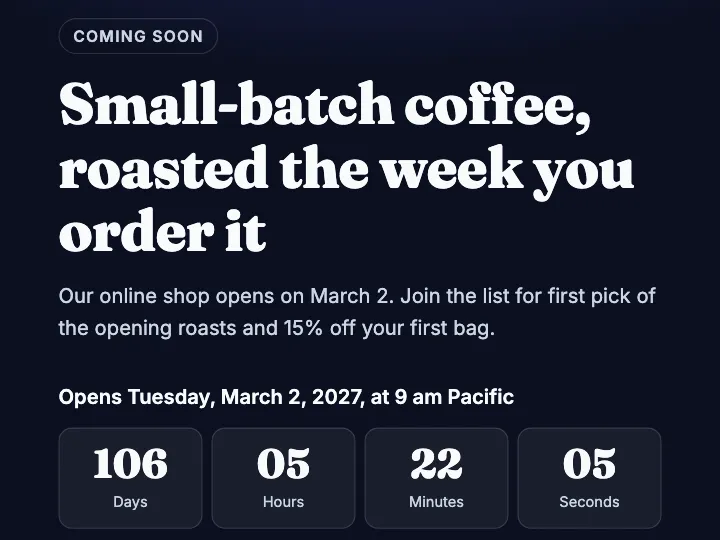
How to make a one page website
1
Type what's coming
Write the name, one line on what you're launching, the date, and the links to show.
2
Get your page
In a few minutes the AI makes the page, with the countdown running to your launch time.
3
Publish and collect emails
Sign up free and publish. Signups are saved in your dashboard, and you get notified by email.
What's on your page
- Your name with a logo mark, a "Coming soon" label, and a large headline
- A countdown to launch day in days, hours, minutes, and seconds
- An email signup that works with no backend and no form service
- Signups saved in your dashboard, with email notifications and a CSV download
- Buttons for the links you give, such as Instagram or your shop
- A look in dark, light, or bright colors
What Free gives and what Pro adds
On Free, your one page website is live at its own link or at your own domain, with page views, visitors, and where they came from. Up to 50 signups a month show in your dashboard and reach you by email. Switch to Pro to see the ones saved beyond that.
Pro takes the Convika bar off your page, keeps 100 pages live at once, and opens a page only to people with its private link or password. Pro starts with a free trial: 7 days free, then $12 a month, cancel any time before it ends.
Frequently asked questions
Is the one page website free?
Yes. Making the page here is free and needs no account. To keep it, sign up for a free Convika account and publish it on the Free plan, with the email signup, visitor stats, and a custom domain included.
Where do the email signups go?
Into your Convika dashboard, under Form entries, with notifications by email. You can download the list as a CSV or JSON file.
Can I use my own domain?
Yes, on the Free plan. Type your domain under Custom domain on the page's screen and add the DNS records it shows. You buy the domain itself from a registrar.
What happens on launch day?
The countdown turns into a "We're open" line at zero. Publish your launch page at the same link, and everyone who saved the address lands on it.
Can I change the page later?
Yes. Ask the AI in your dashboard, such as "move the launch to June 1", and publish again. The link stays the same.
Guides
Free landing page builder with a waitlist signup form: create your waitlist page on Convika
Convika is a free landing page builder with a waitlist signup form built in: generate or upload the page, add an email form that saves signups, publish free. 5 steps.
How to add a waitlist signup form to a landing page you made with ChatGPT
Upload the landing page ChatGPT made to Convika, click Add a form to my page, and collect signups in your dashboard. No backend, free, any ChatGPT plan. 5 steps.
Best free waitlist tools in 2026: free plan limits for product launches, restaurants, and events (checked November 16, 2026)
Convika hosts your waitlist page and shows 50 signups a month free; LaunchList keeps 100, Tally has no cap, Waitwhile and Luma run restaurant and event waitlists.
Best free landing page hosting with forms and a custom domain: Convika, Netlify, Cloudflare Pages, GitHub Pages, Vercel and 6 more (checked November 20, 2026)
Convika hosts a landing page free with a form that keeps entries, your own domain, and visitor stats, and it takes the HTML ChatGPT or Claude wrote. 11 free plans compared.
Carrd alternatives for landing pages you generate with AI
Convika publishes the HTML your AI wrote as it is, free, with a form that keeps entries and visitor stats. Compared with Carrd, Framer, Dorik, and Lovable.